


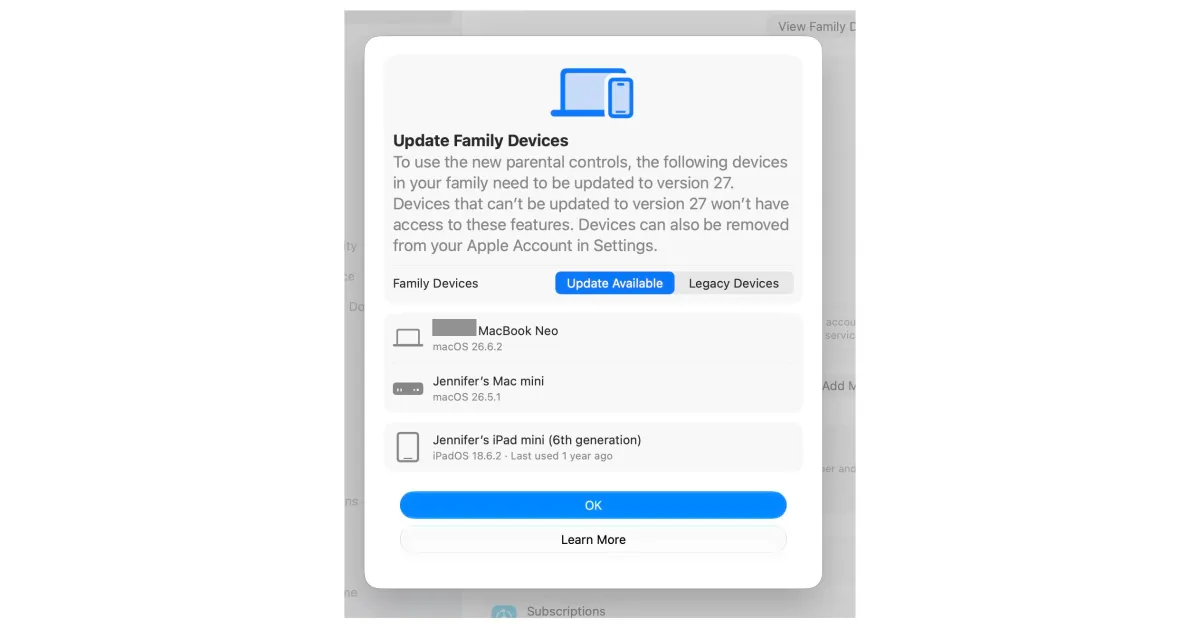
After suffering years of frustration with Apple’s parental control features, I’ve been eagerly anticipating the revamped Screen Time that launched last month with iOS 27. Unfortunately, I can’t use it.
Technically, this is because my 18-year-old son hasn’t got round to updating his MacBook. But mostly, it’s because Apple’s rollout of the new feature has been confusing and frustrating, with fiddly requirements that might have you digging through drawers for your old devices.
“We’re working to resolve delays some families are seeing.”
— Katie Lowry, Apple spokesperson
I’m not even trying to use Screen Time on my son’s devices. He’s 18, away at college, and well beyond my parental controls. The problem is I apparently need him to update his MacBook Neo before I can use Apple’s new Screen Time features on my 15-year-old daughter’s iPhone. His college is four hours away, and like many college kids, he’s an expert at ignoring text messages from his mom asking him to do a boring chore.
My problem stems from Apple’s requirement that, to use the new Screen Time on any device in your connected household, every iPhone, iPad, Apple Watch, Mac, and even Vision Pro in your Apple Family Sharing group has to be updated to the relevant OS 27.
On top of that, if you have older devices that aren’t compatible with the latest OS, you can’t use the new Screen Time on them at all. While Apple says these “legacy devices” won’t prevent you from using the new Screen Time on newer devices, some users are finding they can only turn on the new Screen Time features after deleting the old gadgets from their accounts.
All of this is creating a lot of frustration for parents like me, who just want a reliable, easy way to manage their child’s screen time. I reached out to Apple about the problems I’ve been having, and the company acknowledged the issues, saying it is making changes to “resolve” them.
”This is our biggest child safety update yet, designed to give families even more tools to help keep children safe,” Apple spokesperson Katie Lowry told me. “We’re continuing to improve the rollout of the new parental controls so parents can get set up quickly and easily, and we’re working to resolve delays some families are seeing.”
Apple’s Screen Time is the company’s version of parental controls, and it’s been beset by issues since its introduction in 2018. In the years I’ve been using it, I’ve faced ongoing problems, from settings not syncing reliably across devices to trouble managing contacts and time limits remotely. And of course, my children finding ways to override my settings, thanks to Reddit threads, YouTube videos, and annoyingly good guesses.
When Apple dedicated a big slice of its 2026 WWDC keynote to Screen Time, I was hopeful it meant the company had taken parent feedback seriously and was building a more robust and easier-to-use experience. The updates and new features look promising, but I haven’t been able to try them because of the ongoing setup issues. And I’m not alone.
To use the new Screen Time on any device in your Family Sharing group every device has to be updated to OS 27
Alongside the roadblock with my son’s MacBook Neo (which, admittedly, is on us), I’ve run into several other hurdles while trying to access the new Screen Time.
There’s the problem that Apple thinks my Mac Mini, which I updated to macOS 27 over a week ago, is still on macOS 26. There’s the problem of my sixth-gen iPad Mini that I handed down to my son, but which Apple still lists under my name and as running iPadOS 18. Then there’s the problem that my daughter’s iPad Pro is too old to update to the latest software.
To reiterate, to use the new Screen Time on any device, every eligible device has to be updated to OS 27, because the new Screen Time uses a completely redesigned iCloud architecture.

My son’s iPad Mini is compatible, and I updated it when he was last home (without his MacBook). But when I went to enable the new Screen Time controls again, Apple showed that same iPad Mini under my account as needing to be updated. That iPad obviously doesn’t exist: a ghost iPad, you might say. Eventually, removing it from my account fixed the problem (Settings > Apple Account > Devices > Remove Device), but it took several attempts digging through menus, plus waiting a full weekend for it to clear.
In fact, all my attempts to conform to Apple’s requirements for the new Screen Time have taken a while to kick in. It seems there’s a delay between updating a device and the service becoming available. My editor updated all his devices but still didn’t have access. It was only after waiting and removing all his legacy devices — those that can’t be updated to 27 — from his account that the option appeared.
It’s unclear whether it was time or his actions that led to his eventual success. Apple’s documentation says legacy devices shouldn’t stop you from using the new Screen Time on compatible devices, but some Reddit users also found that removing them unlocked access. Either way, Apple needs to make this whole process clearer so families don’t give up on trying to access what I hope are valuable features.

The fact that these legacy devices can’t use the new Screen Time features raises a bigger issue. Passing older devices down to children is common in families, and the requirement to be on version 27 will mean many kids’ devices won’t get access to the improved parental controls.
For example, my daughter’s third-gen iPad Pro (a hand-me-down from my husband) taps out at iPadOS 26, meaning it can’t ever run the new Screen Time. So, she will have one device (her iPhone 15) that can use the new Screen Time and one device (her iPad) that can’t. I won’t know how this will work until I have access, but my guess is it won’t be fun.
My guess is that I’ll have to use the old Screen Time directly on the iPad, rather than managing it from my phone as I do now. This is because it won’t be compatible with the upgraded iCloud architecture that syncs settings between devices in your family group. If you have multiple older devices, you may want to just stick with the old Screen Time controls for now.
My son might be suspicious of my request to update his device so I can use Screen Time on his sister’s iPhone.
In the meantime, I’m still trying to figure out what bug is causing my Mac Mini to block the update, while continuing to nag my son to update his MacBook Neo. College is a fun, busy time, and “update software on my computer” is low on his to-do list. But his reticence just might stem from being slightly suspicious of my request to update his device so I can use Screen Time on his sister’s iPhone.
Technology certainly has added another tricky layer to the parent-child relationship. After a decade of attempting to balance giving my kids access to the benefits of technology with keeping them safe and teaching them healthy habits, I’m frankly exhausted. I have a couple of years left in my struggle, but the irony of this situation isn’t lost on me; that the system meant to protect one child now depends on the goodwill of the other, who is totally over it.
These Apple devices are compatible with the new Screen Time
- MacBook Neo (2026)
- MacBook Air with Apple silicon (2020 and later)
- MacBook Pro with Apple silicon (2020 and later)
- iMac with Apple silicon (2021 and later)
- Mac Mini with Apple silicon (2020 and later)
- Mac Studio (2022 and later)
- Mac Pro with Apple silicon (2023)
- iPhone Duo
- iPhone 18 Pro Max
- iPhone 18 Pro
- iPhone 17 Pro Max
- iPhone 17 Pro
- iPhone Air
- iPhone 17
- iPhone 17e
- iPhone 16 Pro Max
- iPhone 16 Pro
- iPhone 16 Plus
- iPhone 16
- iPhone 16e
- iPhone 15 Pro Max
- iPhone 15 Pro
- iPhone 15 Plus
- iPhone 15
- iPhone 14 Pro Max
- iPhone 14 Pro
- iPhone 14 Plus
- iPhone 14
- iPhone 13 Pro Max
- iPhone 13 Pro
- iPhone 13
- iPhone 13 mini
- iPhone 12 Pro Max
- iPhone 12 Pro
- iPhone 12
- iPhone 12 mini
- iPhone 11 Pro Max
- iPhone 11 Pro
- iPhone 11
- iPhone SE (2nd generation and later)
- iPad Pro (4th generation and later, M1 and later)
- iPad Air (4th generation and later, M2 and later)
- iPad (9th generation and later, A16)
- iPad mini (6th generation, A17 Pro)
- Apple Watch SE 3
- Apple Watch Series 9
- Apple Watch Series 10
- Apple Watch Series 11
- Apple Watch Series 12
- Apple Watch Ultra 2
- Apple Watch Ultra 3
- Apple Watch Ultra 4
