


Follow ZDNET: Add us as a preferred source on Google.
ZDNET’s key takeaways
- Microsoft is touting its new customizable right-click context menus.
- You’ll be able to tweak the menu by adding and removing commands.
- Hopefully, this will reach all Windows users by year’s end.
Right-clicking your mouse in Windows 11 File Explorer displays a context-sensitive menu with commands you can run on your current file, folder, or other item. But the more applications you install, the more crowded and chaotic that menu becomes, making it difficult to navigate and use. Thankfully, Microsoft finally has a solution in the wings.
Also: Microsoft is merging Copilot and Copilot 365 into one unified app – and retiring 3 features
In its latest blog for Windows Insiders, Microsoft touted its upcoming new customizable context menu. With the new menu, you’ll be able to add commands you use regularly and remove those you don’t want. The overarching goal is to reduce the clutter and streamline the menu based on your own preferences.
“Today, we’re excited to announce an updated context menu that delivers a faster, simpler, and more customizable experience,” Microsoft said in the blog. “The new design reduces top-level clutter, keeps commonly used actions easy to access, and introduces a new Settings experience that gives you more control over what appears in the menu.”
This isn’t the first time Microsoft has attempted to ease the challenges of using the context menu. Older versions of Windows saddled you with a menu that grew longer and more unwieldy as you installed more applications.
With Windows 11, the company tried to address that problem by unveiling a new, modern, and simpler menu with only core commands. But you still have to turn to the older menu to find the additional commands you want, which defeats the whole purpose. By customizing the new menu, you’ll hopefully no longer need to revert to the older legacy one to find those extra commands.
Also: I read Microsoft’s Windows 11 ‘quality’ progress report – and the subtext says it all
To preview the new customizable menu, you must be running the latest Windows 11 Insider build, specifically build 26340.9212. Since these insider builds can be unstable, you’ll want to run this on a spare PC or a virtual machine. But that’s only part of the equation. The new menu hasn’t officially rolled out for insiders just yet, so there’s one more step.
Thanks to a tip from the helpful phantomofearth account on X, you must also install a free utility called Vivetool, available on the program’s GitHub page. With Vivetool installed, open a command prompt as an administrator and navigate to the folder that contains the Vivetool files. At the command prompt, type: vivetool /enable /id: 60813048.
Here’s what you can do with the new menu
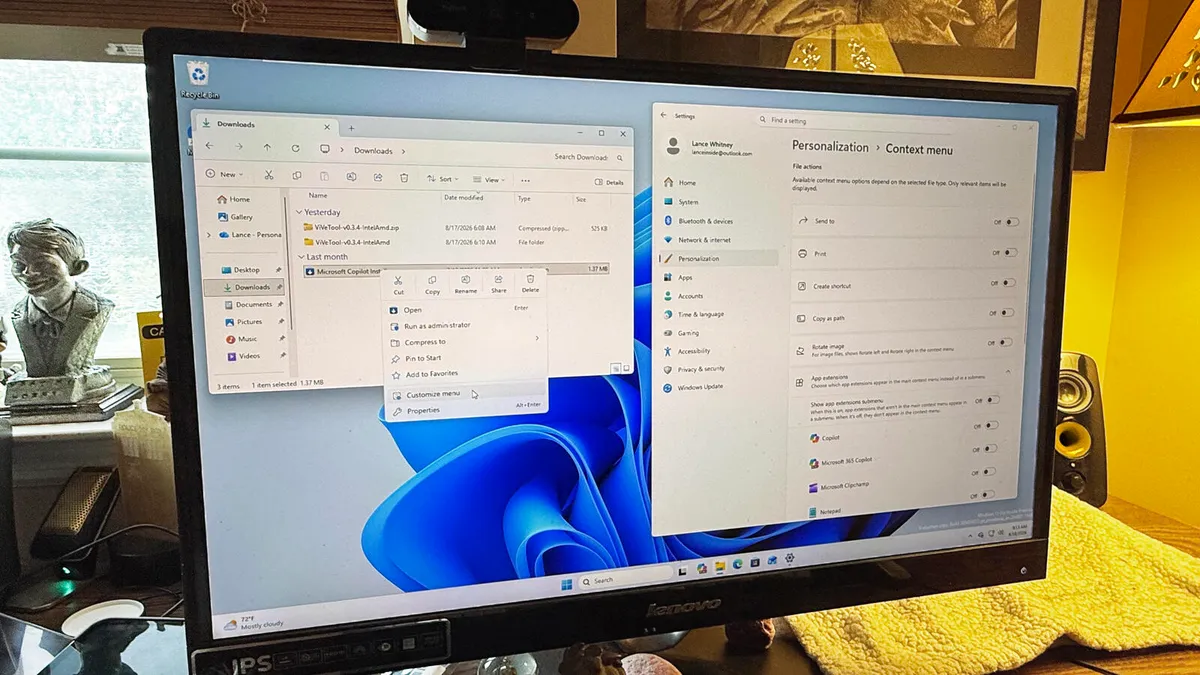
Reboot your PC and log back in. Open File Explorer and right-click on any item. The familiar context menu should display a new command called Customize menu. Click that one, and you’re taken to the Settings app where you can now tweak the menu. And what exactly can you do?
First up, the Settings screen for the context menu displays several key Windows commands, such as Send to, Print, Create shortcut, Copy as path, and Rotate image. Here, you can turn each of these on or off.
Next, you can decide if you want the menu to show you certain app extensions, including Copilot, Microsoft Clipchamp, Notepad, Paint, OneDrive, and Photos. You can also turn off this submenu entirely to further reduce clutter.
After that, you can choose whether to show the Cut, Copy, Paste, Rename, Share, and Delete commands in a row or inline with the menu. You’re also able to move cloud storage commands to their own section, include the option to show the legacy menu, and move the Properties command to the bottom of the menu.
Also: Why your Windows installation files keep getting bigger – AI is filling up smaller drives
The more applications you’ve installed on your PC, the more options you’ll find for adding or removing in the menu. If you prefer the menu to be as sparse as possible, you can remove all or most of them. But if you’d rather keep the menu a bit fuller while still effective, you can choose which ones to add.
With the new customizable menu not yet officially available even for Windows Insiders, I don’t know when this feature will reach the general public. That schedule will be based partly on user feedback and partly on Microsoft’s priorities. But hopefully we’ll see it arrive by the end of the year, if not sooner.
I’ve long been frustrated by the challenges of the context menu. I do often find myself bouncing back and forth between the newer, simpler menu and the older legacy one. For that reason, I look forward to the official debut of this new customizable menu.
