

Close Menu
NCIJ Network NCIJ Network
    What's Hot

    Inside the FBI’s under-the-radar crypto crime symposium

    September 24, 2026

    Floating weeds threaten farming and fishing at Malawi’s Chia Lagoon

    September 24, 2026

    Turkey to hand over military base in northern Iraq to Baghdad

    September 24, 2026
    Facebook X (Twitter) Instagram
    Trending
    • Inside the FBI’s under-the-radar crypto crime symposium
    • Floating weeds threaten farming and fishing at Malawi’s Chia Lagoon
    • Turkey to hand over military base in northern Iraq to Baghdad
    • Netanyahu calls Macron’s West Bank comments in UN speech ‘grotesque’
    • Tony Blair says Britain should work towards rejoining EU in next 10 years | Brexit
    • How to fix your Windows File History if the September update broke it
    • IonQ Targets Quantum Error-Correction Bottleneck With Single-CPU DecoderIonQ Says Sin
    • Bitcoin slips below $85,000 as 5% Treasury yield returns to haunt risk assets
    • About
      • Our Team
      • Editorial Policy
      • Editorial Independence
      • International Support
    • Trust & Standards
      • AI Usage Policy
      • Conflict of Interest Policy
      • Corrections Policy
      • Ethics Policy
      • Fact-Checking Policy
      • Source Protection
    • Get Involved
      • Guide for Sources
      • Support Independent Journalism
    • Legal
      • Cookie Policy
      • Privacy Policy
      • Terms of Use
    Facebook X (Twitter) Instagram
    NCIJ Network NCIJ Network
    Thursday, September 24
    • Home
    • World
    • Ai
    • Business
    • Politics
    • Health
    • Crypto
    • Science
    • Technology
    • Cybersecurity
    • Defense & Security
    • Economy
    • Energy
    • Europe
    • More
      • Fact Check
      • Investigations
      • Opinion & Analysis
      • Environment
    NCIJ Network NCIJ Network
    Home»Technology

    How to fix your Windows File History if the September update broke it

    NCIJ NETWNCIJ NETWORKBy NCIJ NETWNCIJ NETWORKSeptember 24, 2026 Technology No Comments4 Mins Read
    Share
    Facebook Twitter LinkedIn Pinterest Email

    ZDNET’s key takeaways

    • Last month’s Patch Tuesday update can break File History in Windows.
    • A fix is available through a new optional preview update.
    • But the fix doesn’t apply to Windows 11 23H2 or Windows 10.

    Windows users who rely on File History to back up and recover important files may bump into problems after installing the September security update.

    In its Knowledge Base support pages for the September 8 Patch Tuesday rollout, Microsoft revealed that some Windows users who installed the update may be unable to create or run backups through File History.

    Also: Latest Windows 11 update restores your taskbar control

    Those affected may see a message telling them to reconnect their drive, even if a backup drive is connected and working correctly. Further, the timestamp for the last backup might not get refreshed, while files previously backed up successfully could display an error stating that no previous version is available.

    All current versions of Windows 11 are affected, including Windows 11 26H1, 25H2 and 24H2, and 23H2. Windows 10 is also affected, as people who’ve registered for Extended Security Updates (ESU) continue to receive monthly security updates.

    How to check if you’re affected

    If you think you’ve been hit by this bug, you can check the Windows Event Viewer for application crash events that reference FileHistory.exe or KERNELBASE.dll.

    To do this, right-click the Start button and select Event Viewer. In the left sidebar, expand the section for Windows Logs and click Application. In the right pane, select Filter Current Log. Set the Event level to Error. Under Event sources, select Application Error. Click OK. In the results, look for any mention of FileHistory.exe or KERNELBASE.dll.

    File History has long been a staple of Windows, serving as a useful way to back up and restore important folders and files, including those from your user account and such locations as Documents, Music, Pictures, Videos, and Desktop. Though Microsoft still technically supports it, the company treats it as a legacy feature, and so it’s no longer in development. Instead, Microsoft pushes users to use OneDrive or the Windows Backup program to back up, sync, and recover files.

    Also: How to back up your files in Windows with File History

    Still, enough people likely continue to use File History that any glitch preventing it from working needs to be fixed. And that’s just what Microsoft has done, at least for the latest iterations of Windows.

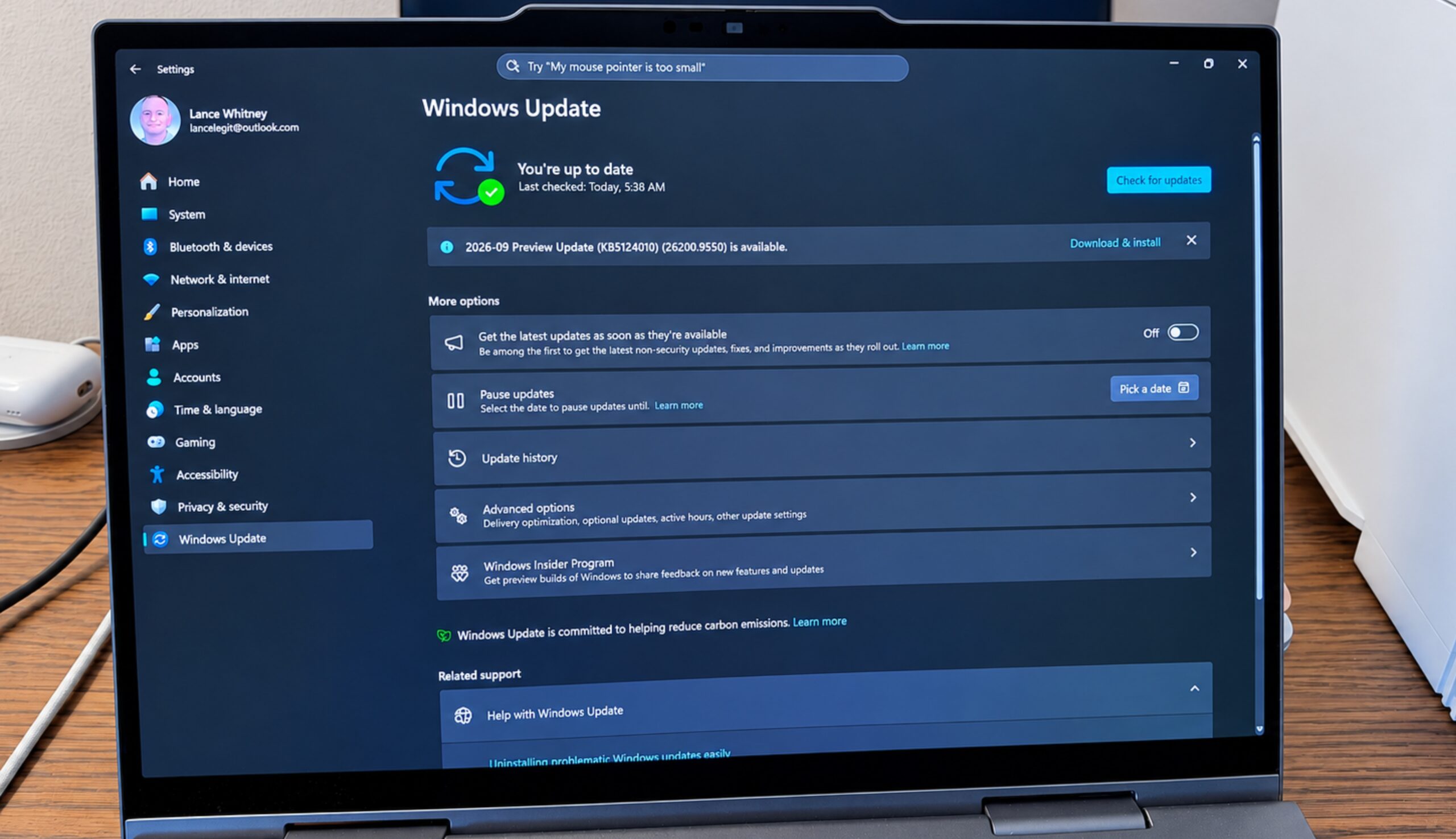
    A new Windows 11 preview update released on Tuesday patches the bug so that File History should start working properly again. This is an optional update, so you’ll have to grab it yourself. Head to Settings, select Windows Update. Look for an update named 2026-09 Preview Update followed by a KB number.

    The KB number will vary depending on your Windows 11 edition. Users of Windows 11 26H1 will find KB5124006 waiting for them. Those who run Windows 11 25H2 or 25H2 will discover KB5124010. Just click the Download & install link to run it. Even though this is a preview update, which can be buggy, this is your only option for now if you depend on File History. If not, you can wait until the October Patch Tuesday rollout, which will carry the same fix.

    Also: Back up your files, or else: Here’s my easy 3-2-1 routine

    OK, but what about Windows 11 23H2 and Windows 10? Well, that’s another story. Microsoft no longer supports version 23H2, while Windows 10 is supported only through the ESU updates. If you need File History on either of these two systems, the company says it’s working on a fix for the issue, which will be released in a future Windows update.


    Lance Whitney is a technology journalist with an IT background. He’s written for TechRepublic, PCMag, Macworld, and Time, among others, He also teaches classes in AI, cybersecurity, and social media.

    See full bio

    Broke File fix History September update Windows
    NCIJ NETWNCIJ NETWORK
    • Website

    Keep Reading

    Anthropic says its biology lab has already found something big

    This Windows Malware is Built to Let Up to Four AI Models Vote on Its Next Move

    If Amazon doesn’t know how to eliminate carbon emissions, then who does?

    AI Agents Teamed Up to Cheat at Blackjack. Their Collusion Is Getting Harder to Spot

    Meta’s Muse AI agent is an effective helper and great at spending money

    Data centers are black boxes, but California wants to change that 

    Add A Comment
    Leave A Reply Cancel Reply

    Editors Picks

    Inside the FBI’s under-the-radar crypto crime symposium

    September 24, 2026

    Floating weeds threaten farming and fishing at Malawi’s Chia Lagoon

    September 24, 2026

    Turkey to hand over military base in northern Iraq to Baghdad

    September 24, 2026

    Netanyahu calls Macron’s West Bank comments in UN speech ‘grotesque’

    September 24, 2026
    Latest Posts

    Ransom Cartel ransomware creator sentenced to 16 years in prison

    August 5, 2026

    Uber CEO brushes off reports of a Waymo break-up

    August 5, 2026

    Fauci Faces Contempt Vote. Here Are the Legal Issues Involved.

    August 6, 2026

    Subscribe to News

    Get the latest sports news from NewsSite about world, sports and politics.

    NCIJ Network is an independent digital news platform delivering trusted investigative journalism, European and global news, in-depth analysis, and fact-based reporting with accuracy, transparency, and integrity.

    Facebook X (Twitter) Instagram Pinterest YouTube

    Inside the FBI’s under-the-radar crypto crime symposium

    September 24, 2026

    Floating weeds threaten farming and fishing at Malawi’s Chia Lagoon

    September 24, 2026

    Turkey to hand over military base in northern Iraq to Baghdad

    September 24, 2026

    Subscribe to Updates

    Get the latest creative news from FooBar about art, design and business.

    Type above and press Enter to search. Press Esc to cancel.