


Follow ZDNET: Add us as a preferred source on Google.
ZDNET’s key takeaways
- Google has changed the way sideloading works on Android.
- You must confirm you’re not being coerced into doing so.
- There’s also a 24-hour waiting period before the setting is available.
Sideloading apps on Android is the process of installing an app from a downloaded APK file. Think of it like installing an app from an .exe or .msi file on Windows. You download the file, tap on it, and wait for it to install.
That process has been around for quite some time. However, Google has, on and off, put the kibosh on it because of security concerns. Those concerns are legitimate. You could download an APK package from some unknown website that contains malware, and the next thing you know, your phone is compromised, your data is stolen, and things go south very quickly.
Also: I turned an old Android phone into a server for my LAN – here’s how and why
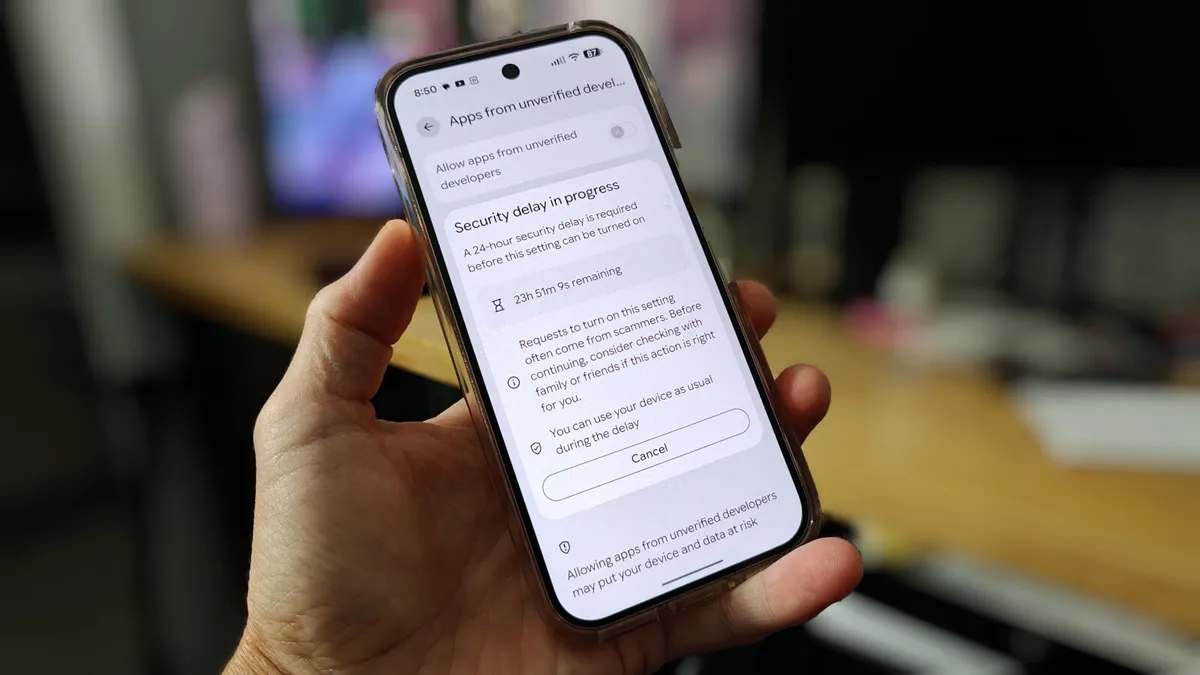
Ergo, Google has randomly made changes to the process, even blocking it from happening in 2025. In a surprising turn of events, Google has opened the process back up, with the caveat of a restart and a waiting period of 24 hours.
This news came via a Reddit post, where Google mentioned the name of the process, Advanced Flow. In the description of the process, Google states, “This flow is a one-time process for power users — but it was designed carefully to prevent those in the midst of a scam attempt from being coerced by high pressure tactics to install malicious software. In these scenarios, scammers exploit fear — using threats of financial ruin, legal trouble, or harm to a loved one — to create a sense of extreme urgency.”
How Advanced Flow works
What you’ll need: The process is still simple; it just takes a bit longer at first. Essentially, you enable the ability to sideload apps, authenticate via your screen lock, confirm that you aren’t being coerced into sideloading apps, restart your phone, wait 24 hours, and then decide if you want to allow installation from unverified developers for seven days or indefinitely.
Note: If you go with seven days, you don’t have to go through the waiting period when you want to re-enable it.
Here are the specifics of the process.
The first thing to do is enable Developer Options by going to Settings, scrolling down to About phone, tapping on Software information, and then tapping your Build number seven times.
Also: How to turn on Android’s Private DNS mode – and why it makes such a big difference
You’ll find Developer options in Settings > System > Developer options.
You won’t see this option until you enable it by tapping your Build number.
Jack Wallen/ZDNET
In Developer options, tap “Apps from unverified developers,” and then tap the On/Off slider for “Allow apps from unverified developers” until it’s in the On position. You’ll then be prompted to confirm it’s you via your configured authentication method.
Also: This silent Android feature scans your photos for ‘sensitive content’ – how to disable it
Clearly, Google wants you to use caution when enabling this feature.
Jack Wallen/ZDNET
In the next window, you’ll be asked if someone is asking you to turn on the setting. Tap “No one asked me.”
If someone asked you to do this … think twice.
Jack Wallen/ZDNET
Also: Want to run a full Linux distro on your Android phone? I found the easiest way
You now need to restart your device and wait through the 24-hour period. You can either tap “Restart later” or go through the process by pressing and holding the Power button and then tapping Restart when prompted.
You can either restart your device later, cancel, or restart immediately.
Jack Wallen/ZDNET
After the 24-hour waiting period, you can go back to the same spot (Settings > Developer options > Apps from unverified developers) and then enable sideloading for either seven days or indefinitely.
Also: 5 ways I speed up my Android phone beyond clearing system cache – all for free
And that’s it.
How to sideload Android apps
After you’ve taken care of the above, you’ll be able to sideload apps on your Android device.
1. Download an APK file
Go to a reputable site and download an APK file. Then, open the Files app and tap the download.
2. Disable Advanced Protection
You’ll be prompted that your device is protected by Advanced Protection. Tap Settings, and then disable Advanced Protection.
Google doesn’t make this easy; you have to disable Advanced Protection.
Jack Wallen/ZDNET
3. Install the app
Once you’ve disabled Advanced Protection, open the Files app, go to Downloads, and tap on the downloaded APK file.
You will then be prompted to install the app.
Installing Local Desktop on Android.
Jack Wallen/ZDNET
4. Re-enable Advanced Protection
This next step is important. After the installation, go back to Advanced Protection (open Settings and search for Advanced Protection) and enable it so you’re getting the most protection possible for your device.
Be careful
I would be remiss if I didn’t give you this word of caution: Be very careful about installing APK files from unknown sites. Two reputable sites are APKMirror and F-Droid, but those sites offer XAPK files, which can only be installed via their respective apps.
To find pure APK files, you can go to Uptodown (which is also reputable). Even then, when you find an app you want from either site, do a bit of searching to make sure the developer is legit and can be trusted.
