


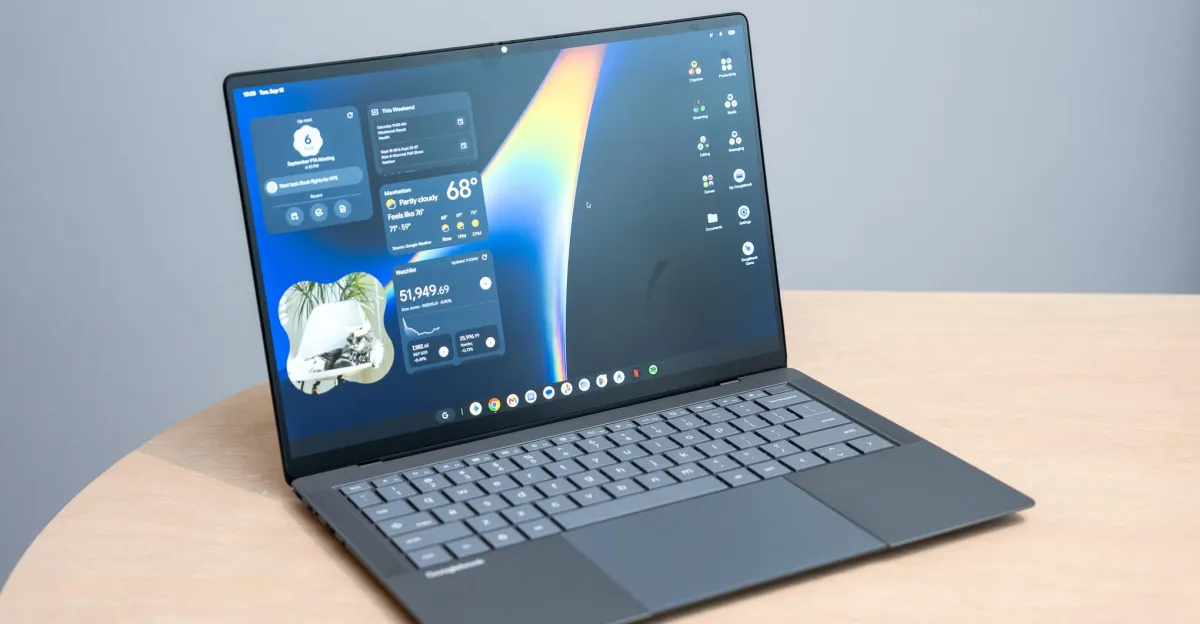
Googlebooks are here. The first models went on sale Sunday, October 4th, and we received review units of all five Googlebooks about 24 hours ago. Since then, we’ve been in a mad dash to put the devices through their paces and get a check on what it’s like to use these Android laptops.
At first glance, Googlebooks feel very Chromebook-ish, and at times a little janky. But Google has some great new ideas afoot on how a laptop and phone interact. You can already link your phone to a Windows laptop to sync your notifications and mirror your whole iPhone on macOS. But Googlebooks allow you to take actions on your phone from your laptop in a way that feels natural. When it works, of course.
Here are all the things we’re learning, feeling, and thinking about so far with Googlebooks. The good, the bad, and the weird.
The Android phone integrations are slick
Googlebooks revolve around using an Android phone, and Google’s execution here is great. Setting up a Googlebook with an Android phone is simple and painless. The out-of-box experience is pretty intuitive, prompting you to pair your phone by scanning a QR code, sign into your Google account, and then download some of the apps you’ve already installed on your phone. It’s similar to the most recent Chromebooks, but it’s intuitive.
Casting apps from your phone, migrating a task from your phone to your laptop with a single click, accessing your phone files on your laptop, and getting your phone notifications on your laptop all work well. These are smart ideas that let you keep your focus on your laptop while you work, but some of them are rough around the edges — in some cases, literally.
App casting allows you to use your phone apps directly on a Googlebook, and it feels natural to launch them straight from an app drawer on a laptop instead of mirroring your whole phone screen. But it also means your two separate app drawers on a Googlebook will have duplicate apps. And there’s nothing to stop you from running a desktop version and mobile version at the same time — even with Chrome. That should be easily ignorable, but clicking on synced notifications (like Slack) can open a casted app instead of a web app or native app on the Googlebook. And casted apps sometimes have pixelated text or oddly proportioned UI. They also look and feel just a touch sluggish in animations and scrolling compared to the native desktop apps.


1/2
Google’s Continue On feature, which temporarily pins an app you’re using on your phone to the Googlebook taskbar, is super neat. If I open a spreadsheet on my phone, I can easily transfer it over to the laptop with one click. Brilliant! Except, most apps I tried don’t sync over to the Googlebook with that functionality — not even Google Maps or Calendar. It seems mostly for Google Docs and Sheets for now, and it’s awesome for those.
Lastly, pulling files directly off your phone from your laptop just works. It’s great!
The Glowbar is fun but not incredibly useful

I love a fancy light show. Google’s Glowbars on these laptops offer Googlebooks a signature flair, but they don’t do much. It’s on the lid, facing away from you, and it’s normally illuminated white while you use the laptop. It alternates colors when you talk to Gemini, and closing the lid temporarily displays a Google-y rainbow before it sleeps.
The most useful function is that it shows the laptop charge level. But I was hoping for some cool animated lights to show a trickling charge while you have the lid closed or something. It just pulses a few times with green, yellow, or red light to give an approximate charge level when you plug in or unplug a power cable. And the Glowbar that actually faces you on Lenovo’s optional AI Mouse is just a glorified RGB strip that you pick the colors for — it doesn’t sync up to the lid lights.
These little light strips are just begging to be tinkered with. I hope Google does much more here. At least start by showing a constant charge level that slowly fills up the strip.
Android apps are still a mixed bag, even with Google’s new desktop ratings

I love that Google is now flagging Play Store apps with desktop ratings. Browsing apps on a Googlebook classifies them in five categories: Made for desktop, Optimized for desktop, Compatible with desktop, Better on the website, and Built for mobile. We haven’t found many “Made for desktop” apps outside of core Google ones and a few other examples like CapCut Pad and BandLab.
“Optimized for desktop” and “Compatible with desktop” designations seem a little loose. Apple Music is optimized, but it doesn’t respond to right-clicks — only a click-and-hold brings up a context menu. And Firefox is compatible, which means it “works with standard mouse and keyboard controls,” yet it doesn’t respond to keyboard shortcuts for creating, deleting, or switching tabs. As expected, Googlebooks are best used with Google’s Chrome.

An app like Slack, which is acknowledged as “Better on the website,” is best used as a progressive web app install — just as it was on ChromeOS. But the web app couldn’t be installed at first while following the usual procedure I know from Chromebooks. After several attempts and starting from scratch by loading up slack.com, Chrome eventually prompted me to install it.
This still feels like a speedy Chromebook with nifty new phone integrations

If I never heard of Googlebooks and you dropped me in front of one of these laptops I’d figure ChromeOS just got a nice upgrade. They feel very Chromebook-ish. That’s not really a bad thing, as I’ve enjoyed Chromebooks for their relatively fuss-free web use. But that also means Googlebooks come with some old trappings of ChromeOS.
Just like on Chromebooks, Chrome on Googlebooks doesn’t support separate Google accounts. You can have multiple Google accounts signed into the Googlebook, but there’s no wall between their browsing, bookmarks, and settings on Chrome like on Windows and macOS.
The quirks that really irk


1/2
App folders and right-click menus opened on the desktop don’t overlay above your windows, so they’re often partially hidden, and they stay open until you click on the desktop. They act this way on all the Googlebooks we’ve tested, whether using the mouse or using touch. What are we even doing here, Google?
And this might mostly be a “me” problem, but I can’t remap the Caps Lock key to Ctrl on a Googlebook, even though that worked just fine on ChromeOS. In fact, none of the remappings for Ctrl, Caps Lock, Alt, or Action (the Google ‘G’ key) seem to work. They’re only remapped on external keyboards — despite the fact that the OS setting for “Modifier keys” is listed under “Physical keyboards.” Android doesn’t seem to account for the keyboards built into these Googlebooks. And frankly, it’s driving me bonkers. (Look, I’ve got very specific muscle memory to maintain.)

I actually stayed up late trying to work my way around this by having Antigravity vibe code an Android app for me to remap Caps Lock to Ctrl, and after several failed attempts and a software-bricked HP keyboard I gave up. (It’s fine, it’s fine. The HP Googlebook’s keyboard works again after I uninstalled the useless app and restarted the laptop.)
Quirks aside, Googlebooks are filled with cool ideas about how get-shit-done computers can interact with the everyday computers that live in our pockets and purses. An ongoing theme playing in my head when using these laptops is: “When this thing works, it works well. When this thing works well, it’s friggin’ sick.” But this OS still feels in a bit of a half-baked state. It needs much more polishing and development, and, ideally, lots of buy-in from developers. Google finds itself in yet another vicious software cycle: it needs developers to help solidify a better user experience, but will developers do that when there might not be tons of users lining up to be Google’s early adopters and glorified beta testers?
