


Written by: Farid Mustafayev, Cybersecurity Expert at ThreatLocker
Named pipes are a common choice for communication between applications running on the same Windows computer. They are fast, supported directly by the operating system, and work well for communication between Windows services, desktop applications, tray processes, command-line utilities, and background agents.
A typical design may include a privileged Windows service acting as the named-pipe server while a user-facing application connects as the client. Because both processes run on the same computer, developers often treat this communication as internal and therefore trusted.
In practice, the pipe is accessible from an environment where many unrelated processes may be running under different users, sessions, and security contexts.
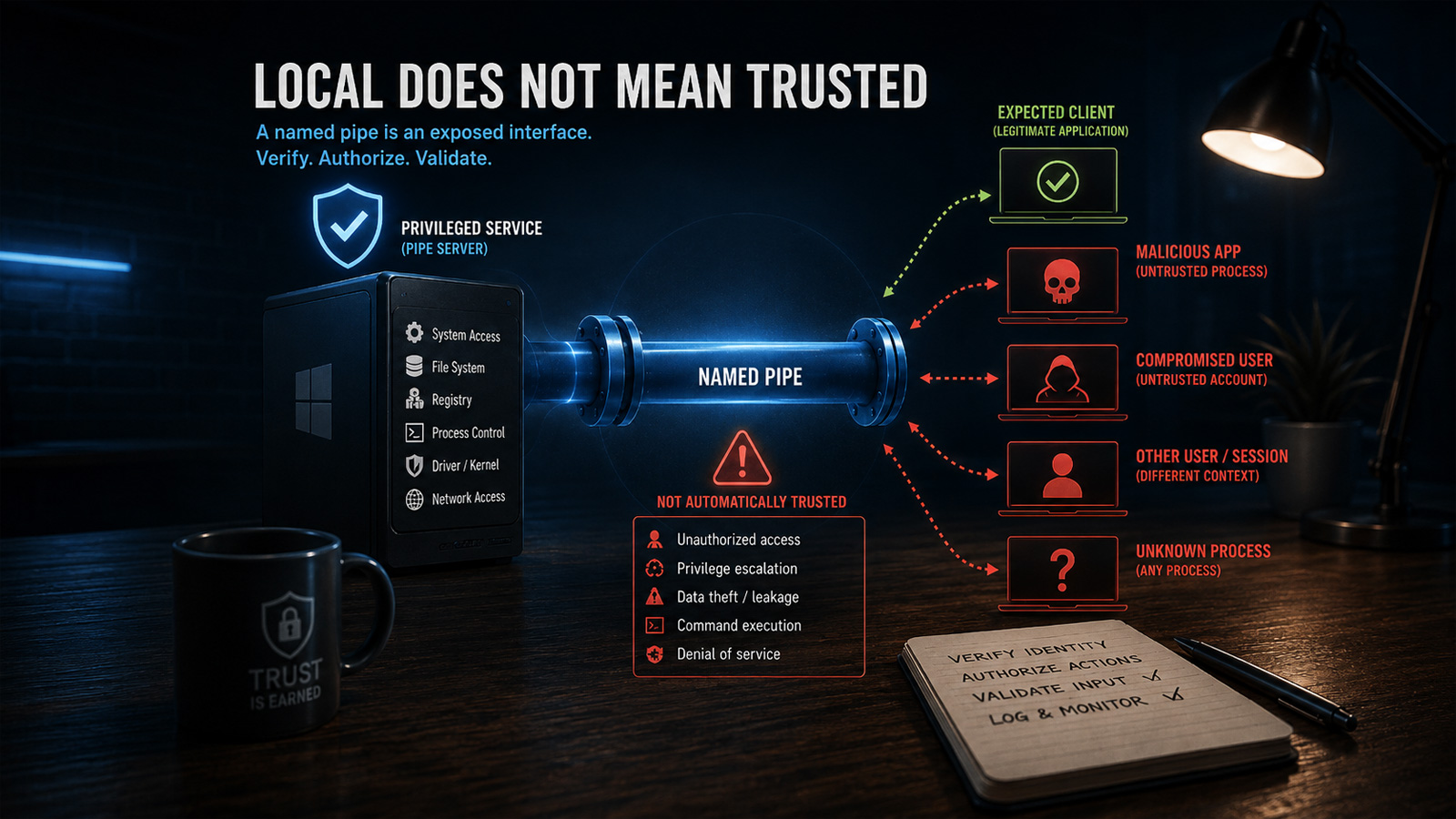
Local Does Not Mean Trusted
Named pipes are often treated as private because they are used for communication between applications on the same computer. That assumption is unsafe.
A Windows workstation may run processes under LocalSystem, administrators, standard users, service accounts, and separate interactive or remote sessions. It may also contain third-party software, scripts, diagnostic tools, and malware operating under a compromised account.
Any process that knows the pipe name and has sufficient access rights can attempt to connect. Windows does not inherently know which executable the developer intended to use the pipe.
For that reason, a named pipe should be treated as an exposed local interface. Before processing a request, the application must determine who connected, what that identity is allowed to do, and whether the supplied data is safe.
Identity, Access Control, and Privilege Boundaries
The risk is greatest when a privileged Windows service communicates with a less privileged desktop application.
A service running as LocalSystem may be able to modify protected files and registry keys, launch processes, change system configuration, access other users’ data, or communicate with kernel drivers. When these operations are exposed through a named pipe, the pipe becomes an API to privileged functionality.
A successful connection proves only that the client was allowed to open the pipe. It does not prove that:
- the client is the expected application;
- the connected user is authorized;
- the requested operation is permitted;
- the supplied command is safe.
Pipe permissions should therefore be defined explicitly and restricted to the smallest appropriate set of identities. Broad permissions for Everyone, Authenticated Users, or all interactive users may allow unrelated processes to reach the pipe.
Authentication and authorization must also remain separate. A user may be allowed to query service status but not stop the service, change protected settings, launch processes, or access arbitrary files. Sensitive commands should be authorized individually.
Impersonation can help by performing operations under the client’s security context, but it must be handled carefully. The server should verify that impersonation succeeded, limit the work performed while impersonating, and always restore its original identity.
See how excessive permissions can turn AI tools into a serious security risk.
Learn how a practical Zero Trust strategy can help contain AI-enabled threats before they spread.
Untrusted Servers, Commands, and Data
The client must verify the server just as the server verifies the client.
A predictable pipe name is only an identifier. It is not a secret and does not prove which process created the pipe. An attacker may create a pipe using the expected name before the legitimate server starts, causing the client to connect to an attacker-controlled process.
The first-pipe-instance option can help detect that the name has already been claimed, but it does not replace proper access controls or server identity verification.
Messages received through the pipe must also be treated as untrusted input. Even an authenticated client may send:
- malformed or oversized payloads;
- invalid file or registry paths;
- unsupported command combinations;
- corrupted serialized objects;
- values designed to trigger error conditions.
A privileged service that converts such input directly into file, registry, process, or command-line operations may become a confused deputy: the attacker supplies the instruction, while the service supplies the privileges.
Requests should use strict message framing, bounded sizes, command allowlists, schema validation, path normalization, operation-specific authorization, and safe error handling.
Availability and Remote Exposure
Named-pipe security is not limited to privilege escalation and unauthorized commands.
A malicious or malfunctioning process may repeatedly connect, hold connections open, send incomplete messages, or submit requests that consume excessive CPU, memory, or kernel resources.
The server should use connection limits, timeouts, cancellation, bounded message sizes, controlled concurrency, and rate limiting where appropriate.
It is also unsafe to assume that every named pipe is reachable only from the local computer. Windows named pipes can support remote access in some configurations.
Pipes intended exclusively for local IPC should explicitly block network identities such as NT AUTHORITYNETWORK, or use a mechanism that guarantees local-only communication.
The correct threat model is simple: every named-pipe connection should be considered potentially hostile until the client or server identity, permissions, requested operation, and message contents have all been verified.
When a Named Pipe Becomes a Security Boundary
A named pipe becomes a security boundary when the processes on its two ends run with different privileges or operate under different trust levels.
A common example is a Windows service running as LocalSystem and a desktop application running under a standard user account. The service may be able to modify protected files and registry keys, start processes, change system-wide configuration, access data belonging to other users, or communicate with a kernel driver. The desktop application normally cannot perform those operations directly.
When the service accepts commands through a named pipe, the pipe becomes an interface to those privileged capabilities. Any weakness in the pipe’s permissions, identity checks, command validation, or authorization logic can allow an untrusted local process to misuse the service’s privileges.
A successful connection does not prove that the client is the expected application. It proves only that the connecting process had sufficient permission to open the pipe. Another process running under the same user account may have exactly the same access. The server must therefore validate the security identity behind the connection rather than relying on the process name, executable path, or secrecy of the pipe name.
The server must also authorize each operation separately. A client that is allowed to request service status should not automatically be allowed to stop the service, modify protected configuration, launch a process, or request access to an arbitrary file.
Authentication determines who connected; authorization determines what that identity may do.
This distinction is especially important when the server processes client-controlled paths, command-line arguments, registry locations, executable names, or serialized commands. Without strict validation, the service can become a confused deputy: the client chooses the action, but the privileged service performs it.
For example, a seemingly harmless request such as:
Read file: C:ProgramDataProductstatus.json
may become dangerous if the client can replace the path with:
Read file: C:WindowsSystem32configSAM
The same problem applies to requests that start processes, delete files, update registry values, install components, or communicate with a driver. The service must not merely validate that the command is syntactically correct. It must verify that the connected identity is permitted to perform that exact operation against that exact resource.
A secure named-pipe server should therefore apply several checks before executing a privileged request:
- verify the connected client’s Windows identity;
- restrict access through an explicit pipe security descriptor;
- authorize each command independently;
- validate all paths, arguments, identifiers, and payload sizes;
- reject unsupported or ambiguous operations;
- avoid exposing general-purpose privileged functionality.
The last point is critical. A command such as “write this value to any registry key” creates a much larger attack surface than a narrowly defined command such as “update this specific application setting.” The more general the pipe protocol becomes, the more closely it resembles a privileged local API—and the more carefully it must be secured.
The correct design principle is straightforward: the pipe server must never perform an operation solely because a connected client requested it. It should perform the operation only after confirming who requested it, whether that identity is authorized, and whether the request stays within narrowly defined security boundaries.
Access Control and Client Authorization
A named-pipe server should decide who may connect before it begins processing messages. This starts with an explicit security descriptor that grants access only to the required Windows identities, such as a particular user SID, service account, administrator group, or logon session.
The pipe’s DACL controls access to both ends of the named pipe. When a client attempts to connect, Windows compares the client’s access token and requested rights with that DACL. Relying on the default descriptor is risky because its permissions may be broader than the application requires.
Access to the pipe does not automatically authorize every available command. A client may be allowed to retrieve status information while being denied permission to modify configuration, start processes, or access protected files. Authorization should therefore be performed for each sensitive operation rather than only once when the connection is established.
For local application-to-application communication, the applications can also inspect the process associated with the opposite end of the pipe:
- the server can call
GetNamedPipeClientProcessId; - the client can call
GetNamedPipeServerProcessId.
These Windows APIs return the process identifier associated with the connected client or server. They should be called only after the pipe connection has been established.
The following C# helper retrieves the peer PID using native Windows APIs:
[DllImport("kernel32.dll", SetLastError = true)]
[return: MarshalAs(UnmanagedType.Bool)]
private static extern bool GetNamedPipeClientProcessId(SafePipeHandle pipe, out uint clientProcessId);

[DllImport("kernel32.dll", SetLastError = true)]
[return: MarshalAs(UnmanagedType.Bool)]
private static extern bool GetNamedPipeServerProcessId(SafePipeHandle pipe, out uint serverProcessId);
We can also call another function from kernel32.dll, QueryFullProcessImageName, to retrieve the executable path from a process handle opened with PROCESS_QUERY_INFORMATION or PROCESS_QUERY_LIMITED_INFORMATION. The returned path can then be compared with the expected executable location as an additional verification step.
On the server side, verification should occur immediately after accepting the connection and before reading or executing commands:
The expected executable should be located in a directory that standard users cannot modify. Otherwise, an attacker may replace the file while retaining the expected path.
For stronger verification, the application can additionally validate the executable’s Authenticode signature or compare it with an approved cryptographic hash. Windows provides WinVerifyTrust for validating signed executable files.
However, a PID and executable-path check must remain a secondary control rather than the primary authorization mechanism. Security research has demonstrated ways to spoof the PID reported for a named-pipe client and ways to transfer a connected pipe handle to another process. The returned PID may identify the process that opened the connection without proving which process is currently sending every message.
A secure implementation should therefore combine several controls:
- an explicit and restrictive pipe DACL;
- verification of the client’s Windows identity or SID;
- authorization for each privileged command;
- strict validation of message contents;
- optional PID, executable-path, signature, or hash verification as defense in depth.
The connection should be rejected whenever identity verification fails or cannot be completed. A privileged service should never fall back to accepting the request merely because the pipe connection itself succeeded.
Impersonation and Privileged Operations
A named-pipe server often runs with more privileges than the client connected to it. For example, a Windows service may run as LocalSystem, while the client application runs under a standard user account. If the service performs every requested operation under its own identity, the client may indirectly gain access to files, registry keys, processes, and system resources that it could not access directly.
Named-pipe impersonation allows the server to temporarily execute code under the security context of the connected client. Windows then evaluates resource access using the client’s token rather than the service account’s token.
In .NET, NamedPipeServerStream.RunAsClient provides a controlled way to impersonate the connected client:
server.WaitForConnection();

server.RunAsClient(() =>
{
    string path = @"C:ProgramDataMyApplicationsettings.json";

    // Access is checked using the connected client's identity.
    string content = File.ReadAllText(path);

    ProcessClientData(content);
});
This approach is useful when the client should be able to perform an operation only if its own Windows account already has permission. For example, impersonation can be used when reading a user-owned file, accessing a user-specific registry key, or validating whether the client has access to a protected resource.
However, impersonation is not a replacement for authorization. A server should still verify that the client is allowed to request the operation. Impersonation only changes the security context under which Windows performs access checks; it does not determine whether the command itself is appropriate.
A privileged service should also avoid switching unnecessarily between the client identity and the service identity. Consider a request that asks the service to read a file and then install its contents as configuration.
The file may be read while impersonating the client, but the installation may occur later under LocalSystem. In that case, the client can still influence a privileged operation even though part of the request was processed under impersonation.
The safer design is to separate the operation into clearly defined stages:
- Authenticate and authorize the client.
- Validate all client-controlled paths, arguments, and data.
- Impersonate only for operations that should use the client’s permissions.
- Return to the service identity before performing narrowly defined privileged work.
- Revalidate any data crossing from the impersonated stage into the privileged stage.
The impersonation scope should be as small as possible. Long-running work, callbacks, asynchronous operations, and unrelated service logic should not execute under the client’s identity.
When native Windows APIs are used, the same pattern applies:
[DllImport("advapi32.dll", SetLastError = true)]
[return: MarshalAs(UnmanagedType.Bool)]
private static extern bool ImpersonateNamedPipeClient(SafePipeHandle pipe);

[DllImport("advapi32.dll", SetLastError = true)]
[return: MarshalAs(UnmanagedType.Bool)]
private static extern bool RevertToSelf();
The server must check whether ImpersonateNamedPipeClient succeeded and must always call RevertToSelf in a finally block:
if (!ImpersonateNamedPipeClient(server.SafePipeHandle))
{
    throw new Win32Exception(Marshal.GetLastWin32Error());
}

try
{
    // Runs under the connected client's security context.
    PerformClientScopedOperation();
}
finally
{
    if (!RevertToSelf())
    {
        throw new Win32Exception(Marshal.GetLastWin32Error());
    }
}
Failure handling is critical. If impersonation fails and the service continues processing, the operation may execute under the service’s original privileged identity. A failed impersonation attempt must therefore cause the request to be rejected rather than silently falling back to the server account.
The same principle applies after impersonation. The application must reliably restore its original identity before processing another client or performing unrelated work. Otherwise, later operations may accidentally execute under the previous client’s context.
Privileged pipe commands should also be narrow and purpose-specific. A command such as:
Write any value to any registry key
creates a much larger attack surface than:
Update the application's approved policy setting
The service should not expose general-purpose file access, registry modification, process creation, or command execution merely because it can perform those operations. Each privileged command should define exactly which resources may be accessed, which values are accepted, and which client identities may invoke it.
Impersonation is most effective when used as one layer in a broader security design. The server should still enforce restrictive pipe permissions, verify the connected client, authorize each command, validate every request, and keep privileged operations narrowly scoped.
Treating Pipe Messages as Untrusted Input
Verifying the process connected to a named pipe does not make its messages safe. The legitimate application may be compromised, contain a vulnerability, or pass user-controlled data to the pipe. A malicious process may also obtain or inherit a valid pipe handle.
For this reason, every message received through a named pipe should be treated as untrusted input. The server should validate both the structure of the message and the operation it requests before performing any privileged action.
A dangerous implementation may deserialize a request and execute it directly:
PipeRequest request = Deserialize(data);

File.WriteAllText(request.Path, request.Content);
Even when request has the expected structure, values such as Path and Content remain controlled by the client. A privileged service could therefore be instructed to overwrite files outside the application directory, modify protected configuration, or consume excessive disk space.
The safer approach is to expose narrowly defined commands and validate every field:
private static void ProcessRequest(PipeRequest request)
{
    if (request == null)
        throw new InvalidDataException("The request is missing.");

    switch (request.Command)
    {
        case PipeCommand.UpdateConfiguration:
            ValidateConfiguration(request.Configuration);
            UpdateApprovedConfiguration(request.Configuration);
            break;

        case PipeCommand.GetStatus:
            ReturnApplicationStatus();
            break;

        default:
            throw new InvalidDataException("Unsupported command.");
    }
}
The protocol should avoid general-purpose operations such as:
WriteFile(path, content)
StartProcess(path, arguments)
SetRegistryValue(key, name, value)
ExecuteCommand(command)
These commands allow the client to choose both the privileged operation and its target. Prefer application-specific requests whose permitted behavior is controlled by the server:
UpdateApplicationConfiguration(configuration)
RequestApplicationRepair()
InstallApprovedUpdate(updateId)
GetServiceStatus()
Validate Message Structure and Size
A named-pipe connection is a byte stream unless the application deliberately uses message transmission mode. A single Read call is not guaranteed to return the complete application message, and the server should not assume that read boundaries correspond to request boundaries.
The protocol should define explicit message framing, such as a fixed-size header followed by a length-prefixed payload:
[Version][Command][Payload Length][Payload]
The declared length must be validated before allocating memory or reading the payload:
private const int MaxMessageSize = 1024 * 1024;

private static async Task ReadPayloadAsync(
    Stream pipe,
    int payloadLength,
    CancellationToken cancellationToken)
{
    if (payloadLength < 0 || payloadLength > MaxMessageSize)
        throw new InvalidDataException("Invalid payload length.");

    byte[] payload = new byte[payloadLength];
    int offset = 0;

    while (offset < payload.Length)
    {
        int read = await pipe.ReadAsync(
            payload,
            offset,
            payload.Length - offset,
            cancellationToken);

        if (read == 0)
            throw new EndOfStreamException(
                "The pipe was closed before the message was complete.");

        offset += read;
    }

    return payload;
}
Without a maximum size, an attacker may declare a very large payload and force the service to allocate excessive memory. The application should also limit collection sizes, string lengths, nesting depth, and the number of objects accepted by the deserializer.
Validate Values, Not Only Types
Successful deserialization proves only that the payload could be converted into the expected object type. It does not prove that the values are acceptable.
For example, a file path should be normalized and checked against an approved directory:
private static string ValidatePath(
    string suppliedPath,
    string allowedDirectory)
{
    string fullPath = Path.GetFullPath(suppliedPath);
    string fullDirectory = Path.GetFullPath(allowedDirectory)
        .TrimEnd(Path.DirectorySeparatorChar)
        + Path.DirectorySeparatorChar;

    if (!fullPath.StartsWith(
            fullDirectory,
            StringComparison.OrdinalIgnoreCase))
    {
        throw new UnauthorizedAccessException(
            "The requested path is outside the allowed directory.");
    }

    return fullPath;
}
The same principle applies to registry paths, process arguments, URLs, identifiers, update packages, and configuration values. The server should validate each value against an allowlist or a narrowly defined range rather than attempting to block known-dangerous values.
Path checks also require care around symbolic links, junctions, reparse points, and time-of-check/time-of-use races. For sensitive file operations, validating a string path alone may not be sufficient.
Reject Invalid Requests Safely
Malformed or unauthorized messages should be rejected without continuing with partial processing. The server should avoid returning stack traces, internal paths, security tokens, or detailed exception information to the client.
Errors sent through the pipe should use a small, controlled set of response codes:
public enum PipeResult
{
    Success,
    InvalidRequest,
    Unauthorized,
    UnsupportedCommand,
    InternalError
}
Detailed diagnostic information may be written to protected service logs, while the client receives only the information required to handle the failure.
Each request should therefore pass through a predictable sequence:
- Read a bounded message.
- Validate the protocol version and message structure.
- Authenticate and authorize the connected client.
- Validate every client-controlled value.
- Execute only a narrowly defined operation.
- Return a controlled response.
A named pipe is only the transport mechanism. It does not make the data trustworthy, guarantee correct message framing, or prevent a connected process from sending malicious requests. The receiving application remains responsible for enforcing the protocol and protecting every operation exposed through it.
Denial-of-Service and Remote-Access Risks
A named-pipe endpoint may be protected against unauthorized commands and still remain vulnerable to denial-of-service attacks. An attacker does not always need permission to perform a privileged operation; preventing legitimate applications from communicating with the service may be enough to disrupt the product.
A malicious or malfunctioning process can repeatedly connect to the pipe, occupy all available instances, hold connections open without sending complete messages, or continuously reconnect after being disconnected. Once every server instance is occupied, legitimate clients may be unable to establish a connection.
The same risk exists after a connection is accepted. A client may send data extremely slowly, declare an oversized payload, stop halfway through a message, or flood the server with valid but expensive requests. Without limits, these behaviors can consume threads, tasks, memory, CPU time, handles, and internal request queues.
Named-pipe buffers also consume kernel nonpaged pool. The number of pipe instances and the amount of buffered data are therefore limited by system resources. Creating an unrestricted number of instances or selecting unnecessarily large buffers can contribute to resource exhaustion.
A defensive server should establish clear limits for:
- simultaneous connections and pipe instances;
- message and field sizes;
- time allowed to establish and complete a request;
- pending requests per client;
- concurrent expensive operations;
- request frequency;
- internal queue capacity.
Blocking operations should support cancellation and should not wait indefinitely for the client to send more data. When a client exceeds a time, size, or request limit, the server should terminate that connection and release its resources promptly.
Limits should be applied before expensive work begins. For example, the server should reject an excessive declared payload size before allocating the corresponding buffer. Similarly, authorization and basic request validation should occur before disk access, process creation, cryptographic work, database queries, or communication with a kernel driver.
The application should also avoid creating one unrestricted worker thread for every connection. A bounded concurrency model prevents a large number of connected clients from exhausting the process’s thread pool or creating an uncontrolled backlog. Rate limits may be applied per connection, process, user identity, or logon session, depending on the application architecture.
However, availability controls must not rely only on the client PID. A process can repeatedly restart, use multiple processes, or establish connections under the same user account. Several signals may need to be considered together, and the server must retain a global limit even when per-client controls are present.
Another commonly overlooked risk is remote accessibility. Windows named pipes are not necessarily restricted to communication within the local computer. They can also support communication between computers over a network, and Microsoft states that named pipes may be remotely accessible when the Windows Server service is running.
This means that using a local pipe name does not, by itself, guarantee local-only communication. A pipe intended for communication between a local service and a local desktop application should enforce that requirement explicitly.
Native pipe servers can specify PIPE_REJECT_REMOTE_CLIENTS, which causes Windows to reject remote connections automatically. Without that option, remote clients may be accepted and evaluated against the pipe’s security descriptor.
The pipe’s access-control list can also deny access to the NT AUTHORITYNETWORK identity. Where access must be restricted to one interactive session, the server can grant access to the appropriate logon SID rather than to broad groups shared by local and remote users.
These protections should be combined rather than treated as alternatives:
- reject remote clients at pipe creation when the API supports it;
- deny network identities in the pipe security descriptor;
- grant access only to the required users or logon sessions;
- verify the identity of the connected process;
- apply connection, timeout, size, and concurrency limits.
Denial-of-service protection and remote-access restrictions are part of the pipe’s security model. A named-pipe server is not secure merely because unauthorized commands are rejected. It must also remain available to legitimate clients and enforce whether connections are allowed to originate outside the local computer.
Designing a Secure Named-Pipe Architecture
A secure named-pipe design should minimize both the number of exposed operations and the amount of privileged code that directly processes client-controlled data. The pipe should act as a narrow communication boundary, not as a general-purpose interface to the operating system.
A practical architecture separates connection handling, validation, authorization, and privileged execution:
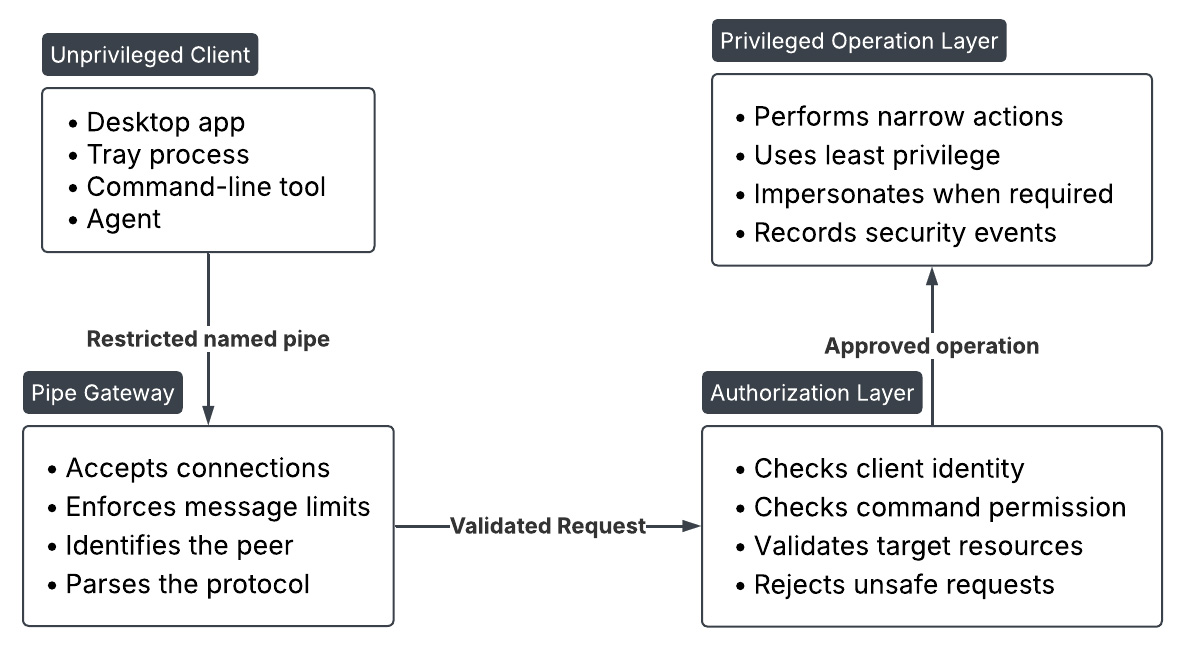
The client should never communicate directly with general-purpose privileged functionality. Instead, it should submit a narrowly defined request to the pipe gateway. The gateway validates the message format and passes only a structured request to the authorization layer. Privileged work begins only after all security checks succeed.
Keep the Pipe Protocol Narrow
The pipe protocol should expose business operations rather than operating-system primitives.
For example, an application may legitimately need to request a policy refresh, install an approved update, obtain service status, or update a specific configuration value. It normally does not need unrestricted commands for writing arbitrary files, modifying arbitrary registry keys, launching arbitrary executables, or executing command-line instructions.
Narrow operations make authorization and validation practical. The server knows which resources each command may access, which fields are expected, and which client identities may invoke it.
A good protocol should include:
- an explicit protocol version;
- a fixed set of request types;
- unique request identifiers;
- bounded payload sizes;
- predictable response and error formats;
- clear rules for unsupported or malformed messages.
The server should reject unknown versions, commands, fields, and states rather than attempting to interpret them leniently.
Separate Connection Access From Command Permission
Permission to connect to the pipe should not imply permission to use every feature exposed through it.
The pipe’s security descriptor should restrict which Windows identities can establish a connection. After connection, the server should identify the client and authorize each command independently.
This makes it possible to support different trust levels through the same service. For example, ordinary users may be allowed to query status, while only administrators or a trusted management process may modify protected settings.
For especially sensitive operations, using separate named pipes may be preferable:
Product.Status       Read-only information
Product.UserActions  Limited user operations
Product.Admin        Administrative operations
Product.Internal     Trusted component communication
Each pipe can then have its own access-control rules, message limits, and supported command set. This is usually safer than placing every operation behind one large protocol and relying entirely on internal command checks.
However, creating additional pipes does not automatically improve security. Each new endpoint increases the attack surface and must be independently protected. Pipes should be separated only when they represent genuinely different trust boundaries.
Use Multiple Layers of Identity Verification
No single identity check should be treated as conclusive.
The architecture may combine:
- a restrictive pipe DACL;
- the connected user’s SID;
- the client’s logon session;
- the peer process ID;
- the executable path;
- the executable’s digital signature;
- application-level challenge and response;
- operation-specific authorization.
Process ID and executable-path checks can help detect unexpected applications, but they should remain defense-in-depth controls. Processes can change, handles can be inherited or transferred, and a trusted process may itself be compromised.
The strongest decisions should be based on Windows security identities and narrowly defined permissions, not only on the apparent executable name.
Isolate Privileged Execution
The component responsible for reading pipe messages should perform as little privileged work as possible.
Connection handling, deserialization, framing, and basic validation are exposed to attacker-controlled input. Keeping this logic separate from privileged operations reduces the impact of a parser or protocol vulnerability.
The privileged operation layer should receive only validated, strongly typed instructions. It should not receive raw message buffers, arbitrary paths, command lines, or serialized objects directly from the client.
For highly sensitive applications, the design can go further by separating the pipe gateway and privileged worker into different processes. The gateway can run with reduced privileges, validate incoming requests, and forward only approved operations to a smaller privileged component through a second restricted channel.
This additional process boundary increases complexity, but it can significantly reduce the amount of attack-facing code running as LocalSystem or another powerful account.
Control the Lifetime of Every Connection
Each accepted connection should have a clear and bounded lifecycle:
- Accept the connection.
- Identify and validate the peer.
- Apply connection-level restrictions.
- Read a bounded request.
- Authorize and validate the requested operation.
- Execute the approved action.
- Return a controlled response.
- Disconnect or wait for the next bounded request.
The server should not allow unauthenticated clients to hold connections indefinitely. Idle timeouts, request deadlines, connection limits, cancellation, and bounded queues should be part of the architecture from the beginning.
Long-running operations should not keep the pipe’s reader blocked unnecessarily. The service may accept the request, assign an operation identifier, and allow the client to query progress through a separate status request. This prevents one connection from monopolizing server resources.
Make the Server Authoritative
The client should request an outcome, while the server determines how that outcome is achieved.
For example, the client may request installation of an approved update by identifier. The server should resolve the package location, verify its signature, determine the installation command, and enforce the permitted destination. The client should not supply the executable path, download URL, command-line arguments, and target directory.
This keeps security-sensitive decisions inside the trusted component and reduces the number of client-controlled values crossing the privilege boundary.
The server should also avoid trusting security decisions previously made by the client. Claims such as “the user is an administrator,” “this file is signed,” or “this path is safe” must be independently verified by the server.
Audit Security-Relevant Activity
A secure architecture should record enough information to investigate suspicious behavior without exposing sensitive data.
Useful audit events include:
- rejected connections;
- failed identity checks;
- unauthorized commands;
- malformed or oversized messages;
- repeated timeouts;
- unexpected process identities;
- privileged operations and their results;
- abnormal connection or request rates.
Logs should identify the Windows user, session, peer PID, command type, and result where appropriate. Raw secrets, authentication tokens, and complete sensitive payloads should not be written to logs.
Repeated failures may indicate an attack, but they may also reveal a defective client version or deployment issue. Audit data should therefore support both security investigation and operational troubleshooting.
Recommended Architecture
For most privileged Windows service scenarios, a defensible design consists of:
- a local-only named pipe with an explicit security descriptor;
- separate endpoints for materially different trust levels;
- verification of both the Windows identity and the peer process;
- a versioned, length-bounded, application-specific protocol;
- authorization for each command;
- strict validation of every client-controlled value;
- short and carefully controlled impersonation scopes;
- a small privileged execution layer;
- bounded connections, queues, and execution time;
- security-focused audit logging.
The central principle is that the named pipe should expose the smallest possible interface between trust levels. A secure architecture does not attempt to make arbitrary privileged operations safe. It avoids exposing arbitrary privileged operations in the first place.
Practical Named-Pipe Security Checklist
Before exposing application functionality through a named pipe, verify that the design addresses each of the following areas:
- Define the trust boundary. Treat the pipe as an exposed local interface, especially when one side runs with elevated privileges.
- Restrict pipe access explicitly. Use a narrow security descriptor instead of relying on default permissions or broad groups such as
Everyone. - Reject remote clients. Configure the pipe for local-only communication and deny network identities when remote access is unnecessary.
- Verify both endpoints. Check the connected Windows identity and, where appropriate, confirm the peer PID, executable path, and digital signature.
- Do not trust the pipe name. A predictable name identifies an endpoint but does not authenticate the process that created it.
- Authorize every command. Permission to connect should not grant access to all operations exposed by the server.
- Keep the protocol narrow. Expose application-specific actions rather than arbitrary file, registry, process, or command-execution capabilities.
- Treat all messages as untrusted. Validate framing, protocol version, command type, payload size, field values, paths, and object counts.
- Apply limits early. Reject invalid sizes and unsupported requests before allocating memory or starting expensive work.
- Use impersonation carefully. Impersonate only when the operation should use the client’s permissions, keep the scope small, and fail closed if impersonation fails.
- Keep privileged execution isolated. Separate parsing and validation from the code that performs privileged operations.
- Control resource usage. Limit simultaneous connections, pending requests, idle time, execution time, queue depth, and request frequency.
- Return controlled errors. Avoid exposing stack traces, internal paths, tokens, or other sensitive implementation details.
- Audit security-relevant events. Record rejected connections, failed identity checks, malformed requests, unauthorized commands, and privileged operations.
- Fail closed. If identity, authorization, validation, or impersonation cannot be completed reliably, reject the request.
A secure named-pipe implementation should not depend on a single protection. The strongest design combines restrictive access control, endpoint verification, operation-level authorization, strict input validation, bounded resource usage, and narrowly scoped privileged functionality.
To learn more about how ThreatLocker can protect against attacks on named pipes, book a demo.
Author Bio:
Farid Mustafayev is a software developer at ThreatLocker specializing in Microsoft Windows Service development and cybersecurity. With more than 15 years of industry experience, he has deep expertise in .NET technologies, including ASP.NET WebAPI, Windows Services, Windows Forms, WPF, RESTful APIs, and low-level Windows internals. He has led the development and hardening of Windows Services designed to protect systems against malware and ransomware, including work with kernel-level integrations and custom driver enhancements.
Previously, Mustafayev served as a Technical Lead, guiding architecture decisions, mentoring developers, and building scalable, maintainable systems. His experience also includes microservices-based architectures and cloud-native solutions on AWS, with a focus on availability, performance, and security across distributed environments.
Sponsored and written by ThreatLocker.
