

Close Menu
NCIJ Network NCIJ Network
    What's Hot

    Australian oil & gas firm makes its first foray into Liberia’s deepwater arena

    September 22, 2026

    Never mind Trump – if Europe wants to save Nato, it must win over the American people | Leslie Vinjamuri

    September 22, 2026

    Where is the US opening new military bases in Greenland? | Donald Trump News

    September 22, 2026
    Facebook X (Twitter) Instagram
    Trending
    • Australian oil & gas firm makes its first foray into Liberia’s deepwater arena
    • Never mind Trump – if Europe wants to save Nato, it must win over the American people | Leslie Vinjamuri
    • Where is the US opening new military bases in Greenland? | Donald Trump News
    • Ed Davey promises £17bn income tax cut if Lib Dems are elected | Liberal Democrat conference
    • Exhibitor program reopened: Book by Sept 30
    • Webinar tomorrow: Inside real-world Google Workspace breaches
    • Binance Takes $100M Stake in Circle Under Five-Year USDC Promotion Deal
    • An Epic View of the Seasons
    • About
      • Our Team
      • Editorial Policy
      • Editorial Independence
      • International Support
    • Trust & Standards
      • AI Usage Policy
      • Conflict of Interest Policy
      • Corrections Policy
      • Ethics Policy
      • Fact-Checking Policy
      • Source Protection
    • Get Involved
      • Guide for Sources
      • Support Independent Journalism
    • Legal
      • Cookie Policy
      • Privacy Policy
      • Terms of Use
    Facebook X (Twitter) Instagram
    NCIJ Network NCIJ Network
    Tuesday, September 22
    • Home
    • World
    • Ai
    • Business
    • Politics
    • Health
    • Crypto
    • Science
    • Technology
    • Cybersecurity
    • Defense & Security
    • Economy
    • Energy
    • Europe
    • More
      • Fact Check
      • Investigations
      • Opinion & Analysis
      • Environment
    NCIJ Network NCIJ Network
    Home»Technology

    Your phone doesn’t block SIM swapping attacks by default: Turn on these carrier settings now

    NCIJ NETWNCIJ NETWORKBy NCIJ NETWNCIJ NETWORKAugust 7, 2026 Technology No Comments4 Mins Read
    Share
    Facebook Twitter LinkedIn Pinterest Email

    Lance Whitney/ZDNET

    In recent years, SIM swapping attacks have increased, prompting the mobile industry to try to combat them more effectively.

    SIM swapping is a type of fraud in which a scammer transfers your mobile phone number to a SIM in their own device. By intercepting calls or texts sent to your phone, they can capture two-factor authentication codes and other information intended for you. From there, the attacker can take over not only your mobile account but also other accounts that rely on authentication.

    Also: The shadowy SIM farms behind those incessant scam texts – and how to stay safe

    SIM swapping attacks can play out in a couple of different ways. A scammer may be able to convince the mobile carrier to transfer the SIM to a new device by pretending to be you. Criminals have also offered money to employees at such carriers as Verizon and T-Mobile, tempting them to perform SIM swaps. 

    The three major US carriers — AT&T, T-Mobile, and Verizon — all offer their own tools to protect your account from SIM swapping scams. I subscribe to Verizon on my main iPhone and T-Mobile and AT&T on my test and backup phones, so I’ve used these security settings for all three. Here’s how to protect yourself from these types of attacks across all three carriers.

    1. Verizon Wireless

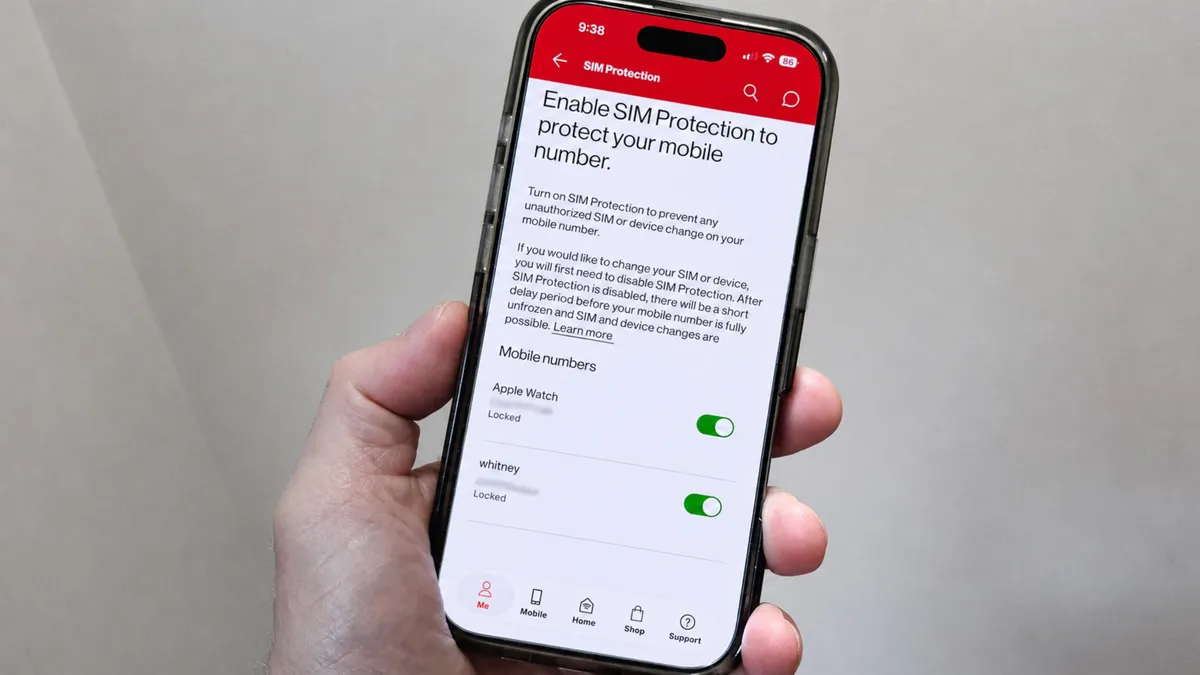
    Verizon offers two safeguards against SIM swapping attacks. SIM Protection prevents unauthorized SIM or device changes on your phone number unless you disable the setting. Number Lock blocks any unauthorized swaps of your mobile phone number. I’ve turned on both and would advise all Verizon subscribers to do the same.

    Also: Still using a physical SIM? This $25 kit brings eSIM to your old phone – here’s how

    SIM swapping attacksTo set these up, sign in to your account at the Verizon website or through the My Verizon app for iOS or Android.

    SIM Protection

    If you’re using the website, select Account at the top of the screen. On the Account page, click Account overview. Next, select Profile and settings. Under the Security section on the left, click the link for SIM Protection. Turn on SIM Protection for each line in your plan, and then click the Save Changes button.

    SIM protection with Verizon

    Screenshot by Lance Whitney/ZDNET

    If you’re going through the My Verizon app, go to the Me screen and tap Profile and settings at the top. Swipe down to the Security section and tap SIM Protection. Turn on the setting for all your lines.

    SIM protection with Verizon

    Screenshot by Lance Whitney/ZDNET

    Number Lock

    To turn on Number Lock on the website or in the My Verizon app, go back to the previous screen after enabling SIM Protection. In the Security section, select the link for Number Lock. Turn on Number Lock for the lines you wish to lock. On the website, be sure to click Save Changes.

    Also: 14 secret phone codes that unlock hidden features on your Android and iPhone

    Number Lock with Verizon

    Screenshot by Lance Whitney/ZDNET

    Verizon offers other security settings worth investigating. You can set up and use a passkey instead of a password. The secret question option lets you choose a question and answer to help Verizon reps confirm your identity if you call to request a change. The Voice ID feature analyzes your speaking voice to verify your identity when you call.

    2. T-Mobile

    T-Mobile’s SIM Protection aims to thwart unauthorized number transfers. To enable this, sign in to your account at the My T-Mobile website. Click the My T-Mobile button at the upper left and select My Profile. On your profile page, select SIM Protection. Turn on the switch for your number and any other lines you wish to protect. Check the box for “I agree to these conditions,” and then click Save Changes.

    Also: How to easily add a backup carrier to your phone – for free or cheap

    SIM protection with T-Mobile

    Screenshot by Lance Whitney/ZDNET

    3. AT&T

    AT&T offers a setting called Wireless Account Lock, which prevents unauthorized account changes, billing updates, and wireless number transfers.

    Also: Lock down your AT&T account to prevent SIM swapping attacks – here’s how

    To set this up, you’ll have to install and use the AT&T app for iOS or Android. Fire up the app and make sure you’re signed in to your account. Tap the person icon at the upper right. Swipe down the screen and tap the setting for Wireless Account Lock. To confirm your action, swipe across your phone in the highlighted area. A message notifies you that your account has been locked.

    If you ever need to disable the account lock to modify your account or phone number, return to the same screen and tap the Unlock Account button.

    Wireless account lock with AT&T

    Screenshot by Lance Whitney/ZDNET

    attacks block carrier Default doesnt phone settings SIM swapping Turn
    NCIJ NETWNCIJ NETWORK
    • Website

    Keep Reading

    Exhibitor program reopened: Book by Sept 30

    Singapore’s Nexstrom wants to bring 2D semiconductors to chip fabs

    Nscale’s IPO will test Wall Street’s appetite for concentrated AI bets once again

    The UK Government Faces a Reckoning Over Palantir

    Kairos Power gets up to $100M from Samsung group to build nuclear reactor for Google

    How to Use AI With Your Privacy Intact

    Add A Comment
    Leave A Reply Cancel Reply

    Editors Picks

    Australian oil & gas firm makes its first foray into Liberia’s deepwater arena

    September 22, 2026

    Never mind Trump – if Europe wants to save Nato, it must win over the American people | Leslie Vinjamuri

    September 22, 2026

    Where is the US opening new military bases in Greenland? | Donald Trump News

    September 22, 2026

    Ed Davey promises £17bn income tax cut if Lib Dems are elected | Liberal Democrat conference

    September 22, 2026
    Latest Posts

    COLDCARD security audit phishing attack installs remote access tool

    August 5, 2026

    Reddit aims to make ‘karma’ less important for first-time posters with shift to AI moderation tools

    August 5, 2026

    Right turn on green: is the Telegraph changing its tune on the climate? | Daily Telegraph

    August 5, 2026

    Subscribe to News

    Get the latest sports news from NewsSite about world, sports and politics.

    NCIJ Network is an independent digital news platform delivering trusted investigative journalism, European and global news, in-depth analysis, and fact-based reporting with accuracy, transparency, and integrity.

    Facebook X (Twitter) Instagram Pinterest YouTube

    Australian oil & gas firm makes its first foray into Liberia’s deepwater arena

    September 22, 2026

    Never mind Trump – if Europe wants to save Nato, it must win over the American people | Leslie Vinjamuri

    September 22, 2026

    Where is the US opening new military bases in Greenland? | Donald Trump News

    September 22, 2026

    Subscribe to Updates

    Get the latest creative news from FooBar about art, design and business.

    Type above and press Enter to search. Press Esc to cancel.