


Comparing Our Favorite E-Readers
Honorable Mentions
Below, find a few more e-readers I like but don’t necessarily love as much as my top picks.
Boox Go 7 ($270) and Boox Go Color 7 ($290): Boox is known for its wide range of e-paper tablets, including the Boox Go 6 (Gen II) I recommend above. If you’re looking for something a little larger with a similar Android-based experience, the Go 7 and Go Color 7 are both solid choices. There are page-turner buttons, and it’s a nice square shape that’s easy to hold and use. If you, like me, don’t use color features a ton, it’s worth saving the extra money on the black-and-white model. Regardless, it’s great that the price difference between the two models isn’t steep.
Boox Palma 2 for $250: This is a fun, pocket-sized device, with fingerprint recognition, a faster CPU, and a newer version of Android than previous models. Former WIRED reviewer Adrienne So loved using it with the Kindle app, but she wishes it cost less. Boox recently announced the Palma 3 is coming out (though it doesn’t have a confirmed launch date) which explains why it’s been unavailable for so long. The Palma 3 is next on my testing list, but if you want a similar device you can purchase now, the Boox Palma 2 Pro ($400) is available with a higher price tag, but color screen.
Nook GlowLight 4 Plus for $200: The 4 Plus is the only waterproof Nook in the lineup, and it has the biggest screen at 7.8 inches, along with 32 GB of storage. It also has physical page-turn buttons and a headphone jack for listening to audiobooks (you can also connect wireless earbuds via Bluetooth). Unfortunately, it was often slower than my Kindle and tended to freeze. While the large library has cheap and even free ebooks, it’s not as good of a selection as Kindle Unlimited. The process of getting a book from the library on a Nook is also frustrating. You’ll need to download either Adobe Digital Editions or Android File Transfer before physically connecting the device to your computer and then transferring the files.
Nook 9-inch Lenovo Tablet for $150: If you mainly read cookbooks or other color-intensive materials, and you want a dedicated reader, you might want to consider this affordable tablet from Nook and Lenovo, which has the Nook app built in. It’s a tablet rather than an e-paper device like the rest of the gadgets in this guide, so you’ll lose the E Ink screen and the distraction-free nature of an e-reader. You can at least turn off notifications while in certain apps, which I recommend doing for the Nook app. It uses Android 13 OS, and it’s not built for heavy work, like video or photo editing.
Xteink X4 for $69 and X3 for $69: These are similar to the Xteink X4 Pro above when it comes to the app and basic capabilities, but you’ll lose out on the touchscreen, home button, and front light. Instead, there are more buttons, providing a Tamagotchi-like experience as you tap them to go back and forth between menus and pages of your reading material. The X3 is super small, with just a 3.7-inch screen that fits on the back of my iPhone 16 Pro, and it has stronger magnets to put itself into place. But the standard X4 is more comfortable to read on than the X3 since it’s larger (and won’t require quite as many page turns, though it’ll still need a lot) with a 4.3-inch screen, like the X4 Pro above.
What I’m Testing Next
There have been several new e-readers announced, mainly new models from Boox like the Palma 3 and Picco, that I’ll be reading my latest books on this fall, which will include R.F. Kuang’s Babel and the latest ACOTAR book, along with an alarmingly long list of suspended holds in my Libby app that I really need to work on. Here’s what I’ll be testing next:
Boox Palma 3 for $320: Boox’s popular Palma devices are made to be mobile e-paper screens, and are a popular choice as a smaller e-reader. The new Palma 3 has been announced after months of the Palma 2 being out of stock, and it promises a 6.13-inch screen, dual-tone front light, a rear camera, dual microphones, and a customizable smart button. There’s no timeline yet for its launch, but I’m hoping we see it available before the end of the year.
Courtesy of Boox
Boox Picco for $100: This miniature e-reader will have a tiny 3.97-inch screen and be Boox’s smallest e-reader to date. The Boox Picco isn’t the smallest e-reader ever—Xteink still holds that crown—but promises a different experience to Boox’s other e-readers and e-paper devices by focusing on Boox’s new Tiles app and productivity tools. Boox says it’s the first of its Tiles ecosystem, so I’m keeping an eye out for more launches within that line. The Picco is currently available for preorder and is due to ship in October.
Boox Note Mini C for $550: When Boox announced the Palma 3, it also announced its new e-paper tablet, the Boox Note Air6 C, and a miniaturized version, the Boox Note Mini C. The Mini C has a smaller 8.52-inch screen that’s more ideal for reading than the larger tablet, and I’m curious how it compares to both the Palma 3 and the Boox Go line.
The 2026 Kindles: Amazon has announced new versions of all three of its main e-readers, with a 2026 version of Kindle ($150), Kindle Paperwhite ($200), and Kindle Colorsoft ($290) coming out this fall, plus a Kids version ($180+) of each of these new models. There are now aluminum-backed versions of all three, though the Paperwhite and Colorsoft have it as part of the higher-end Signature Edition that comes with a few more features. I’ll be testing and will add my top pick to this guide for reference, but this guide will focus more on non-Kindle e-readers going forward.
What If I Want a Kindle?
Maybe you’ve read this guide and decided a Kindle is best for you. That’s fine! Kindle is my longest-used ecosystem and it’s plenty convenient, especially if you already have ebooks purchased through Amazon. While I have an entire guide dedicated to shopping for a Kindle, here’s a quick overview of my top picks (and other models you might spot).
Also, Kindle does have new versions of the base Kindle, Kindle Paperwhite, Kindle Colorsoft, and its Kids versions of each model coming out. You might want to wait and see if you prefer the newest versions to these, and I’ll be testing them soon to see how they compare to past Kindles and other e-readers. Kindle also raised the prices of most of its e-readers at the end of August, and the new models match that pricing.
The Best Kindles
Other Kindles I’ve Tested
Kindle Colorsoft Signature for $320 and Kindle Colorsoft ($290): The Kindle Colorsoft Signature is Amazon’s first Kindle with a color screen. I do like the Colorsoft if you read books with illustrations or heavily annotate your e-books, but the Kobo devices I recommend can do the same thing for cheaper.
Kindle Scribe (3rd Gen, 2025) for $500 and Kindle Scribe Colorsoft for $630: The latest Kindle Scribe arrived in December 2025 with a color version. It also has a new exterior design that does away with the single thicker side and standardizes bezels and frames across all sizes, and a lot of AI features. The older Kindle Scribe (2nd Gen) is still my preferred option if you want a Kindle e-reader that doubles as a digital notebook.
Kindle Scribe Without Front Light for $430: This is the third and final installment of Amazon’s latest generation of Kindle Scribes. It’s similar to the third-gen Kindle Scribe above, but it removes the front light and wireless charging. If you want a cheaper Kindle Scribe, I still prefer the second-generation model, though you’ll lose out on AI reading features and the ability to connect to Google Drive and Microsoft OneDrive.
Great E-Reader Accessories
Looking to jazz up your new e-reader? Here are some of my favorite accessories to pair with my favorite non-Kindle e-readers. It’s a tougher buy to find—since Kindles are so popular, most cases and accessories are made with those models in mind, but there are options out there for the rest of the e-reader world, too. Here’s what I’ve tested and liked for my e-readers.
E-Reader Cases and Straps
An E-Reader Remote

Remotes are a popular tool to turn an e-reader’s pages for you, especially if you’re using a holder (options below!) and don’t want to lift your hand to constantly flip the page. Kobo has a remote designed just for its e-readers to connect and turn pages, no extra accessories required.
E-Reader Holders
FAQs
Ebooks can be cheap, but as with regular books, the cost can add up if you’re a big reader. To keep costs low, take advantage of your library card and check out ebooks instantly from the comfort of your home. We have a detailed guide that explains How to Get Free Kindle Books With Your Library Card, but the short version is that most libraries distribute books via OverDrive. You can access these books a few ways: through Kindle or directly from OverDrive with a Kobo, or you can download the Libby app. These ebooks are automatically removed from your device and returned to the library when they’re due.
Each e-reader’s own book service varies in quality. My favorite is Kindle Unlimited for $12 a month, which includes millions of titles, including audiobooks and magazines. Amazon’s Prime Reading also offers a handful of free books every month, which is good to know if you already have a Prime account. You can even lend books to friends and family for a short while (or have them share a book with you). For more details on each option, check out our guide to the Best Ebook Subscription Services here.
What File Formats Do E-Readers Support?
The most widely used format is EPUB, which works natively with all the e-readers in this guide except for Kindle—technically. You can still upload EPUB files to your Kindle, but you’ll have to use the “Send to Kindle” feature (through Amazon, your email, or the Kindle app) to convert it to Amazon’s proprietary format called AZW. (Newer Kindles support AZW3 and KFX, specifically). Other formats that will work with these e-readers include PDF, TXT, HTML, DOC, and DOCX.
Can I Install Apps on an E-Reader?
Kindle, Kobo, and Nook all use proprietary operating systems that don’t allow you to install third-party apps. The Boox, on the other hand, runs Android (mainly Android 11 and newer). That means you can use it to download any apps available in the Google Play Store or side-load apps from your computer.
Do You Need an E-Reader? What About a Phone or Tablet?
You don’t have to buy a separate device to read ebooks. Smartphones and tablets are perfect for this purpose. You can use Amazon’s Kindle app to read ebooks (iOS, Android) and download OverDrive’s Libby app (iOS, Android) for library-book access. However, the E Ink screens found in e-readers are just nicer to look at. I also like that these devices are one-trick ponies; there are no distracting notifications or social media feeds ripe for doomscrolling.
If you’d still rather have one smart device you can use for reading and other purposes, take a look at our Best Tablets and Best iPads guides for recommendations.
What About a Digital Notebook?
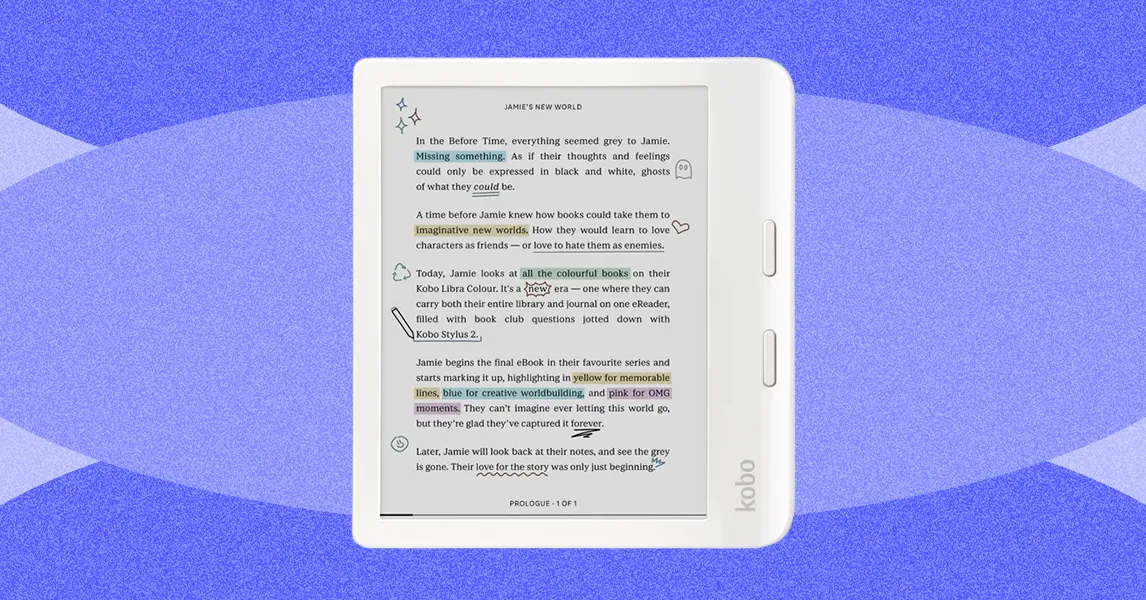
I’ve tried just about every digital notebook on the market; these devices are designed for handwritten notes on an E Ink screen. E-readers with that capability usually still prioritize reading, though there are plenty of models I like that can do both. The Kobo Libra Colour is my favorite option for annotating books, and it can double as a small digital notebook. If you want a larger option, check out my full guide to every digital notebook I’ve tested.
The most important step I take when testing e-readers is to read on them! I spend hours reading books acquired in a variety of formats, including books I purchased directly from each brand’s store, downloaded from local libraries via OverDrive/Libby, and PDFs acquired for free from God knows where.
In the process, I evaluate battery life, brightness, performance lag, screen responsiveness, and text sharpness. I check for extra tools, like whether the tablet in question accommodates accessories like a stylus. I also note features like waterproofing, annotation capability, and access to exclusive subscription services.
Power up with unlimited access to WIRED. Get best-in-class reporting and exclusive subscriber content that’s too important to ignore. Subscribe Today.
