


Don’t rely on default Samsung settings for the best camera experience.
Prakhar Khanna/ZDNET
Follow ZDNET: Add us as a preferred source on Google.
ZDNET’s key takeaways
- The Galaxy Z Fold 8 has two 50MP cameras.
- There’s no telephoto camera, but hi-res mode can improve digital zoom shots.
- Setting the default resolution to 24MP is the sweet spot.
The Samsung Galaxy Z Fold 8 isn’t a camera phone per se, but I’ve definitely enjoyed shooting with it. From the streets of London to the parks of New Delhi, I’ve carried it more than any other phone since its launch in July. Sure, it has one less camera than its Fold 8 Ultra sibling and Samsung’s default processing isn’t the best in the business. But the Fold 8 fits my hands perfectly and its camera hardware is more capable than the spec sheet numbers suggest.
Also: Samsung Galaxy Z Fold 8 review: The compact phone I’ve wanted all along
If you have a Galaxy Z Fold 8 or are planning to purchase one, I suggest changing a few camera settings as soon as you set up the phone. I do this for all Samsung flagship phones, out of the box, but some of them make much more sense on this phone because of its 50MP main camera (vs. 200MP on the Fold 8 Ultra and Galaxy S26 Ultra). I recommend you change these four settings to extract the best quality photos from your new Samsung Galaxy Z Fold 8.
1. Install Camera Assistant to find crucial hidden settings
The Camera Assistant used to be a separate app on Galaxy smartphones, available through the Good Lock like a plugin. Since last year, Samsung started adding it to the Settings menu of the Camera app. You just need to download it, and boom! You have more settings to toggle.
To find Camera Assistant:
- Go to the Camera app on your Galaxy Z Fold 8.
- Tap on the four-dot icon to get the menu.
- Tap on Settings.
- Scroll to the Camera Assistant and tap on it.
-
A Samsung Galaxy Store pop-up will appear. Tap on Install.
Once installed, you’re now ready to take control over the default camera processing and performance to improve your Fold 8’s cameras.
Also: I’ve been using the Galaxy Z Fold 8 for two weeks – these two accessories perfect the experience
2. Set the default mode to 24MP
The first setting I change for Samsung phones with 10MP telephoto cameras (or no optical zoom capability at all, in this case) is to rely on hi-res mode to deliver sharp digital zoom. Out of the box, the Galaxy Z Fold 8 is set to process 12MP photos. They save space, but the photos could use some more details.
Setting the default camera resolution to 24MP will give you better clarity, both from the main and ultrawide cameras without taking up considerable storage (like 50MP mode). This is especially useful for 2x- and 4x-digitally zoomed-in shots (including in lowlight), which could pixelate in 12MP.
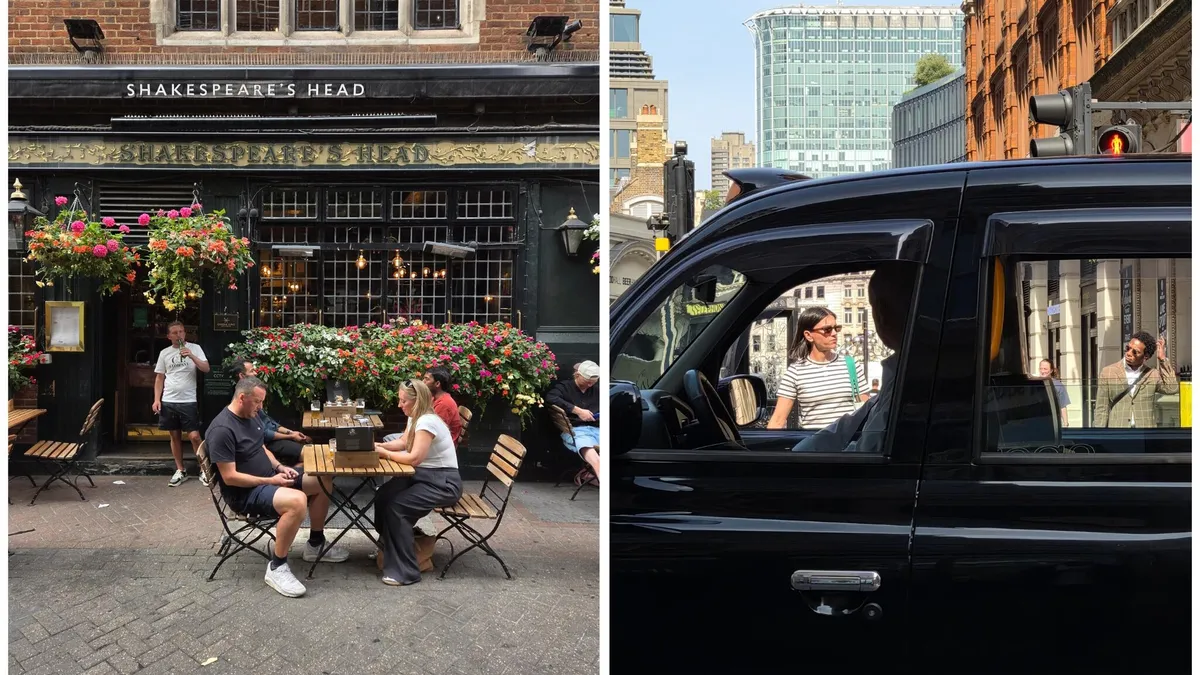
The Galaxy Z Fold 8 has a great form factor for a street photography camera. Samsung has also improved the shutter speed, which, when paired with hi-res mode, delivers excellent results. The car was moving fast in the photo on the right.
Prakhar Khanna/ZDNET
To set 24MP mode by default on the Galaxy Z Fold 8, go to the Camera Assistant settings and:
- Scroll down to find the Photos settings.
- Tap on 24MP resolution.
- Toggle on these two settings: 24 MP in Photo mode and Keep 24 MP resolution.
Also: The Galaxy Z Fold 8 is so good, I don’t see the point of flip phones any more
3. Adjust the photo softening
The Galaxy phones tend to oversharpen skin tones in artificial lighting. If you don’t want that processed look, you can change it by choosing one of the options under Photo Softening settings. You need to set it to Medium or High (according to your taste) to get more natural-looking, softer skin tones.
Photo softening is not like a beautify filter. Turning it to Medium or High in low-light photos can help you get more natural-looking skin tones.
Prakhar Khanna/ZDNET
I took three similar shots in indoor lighting with 50MP mode on 1x. You can notice how the left image (with Photo Softening turned off) has a stronger black point and shadows. It looks too processed. To compare, the other two shots with Photo Softening set to Medium and High have a more natural look. I don’t notice a difference in clarity or details. My skin and beard look detailed in all three photos, but I prefer the softer, less processed photo in the middle and right.
To change this setting, you need to go to Camera Assistant > scroll down to find Photo Softening and set it to Medium or High.
Also: Everything announced at Samsung Unpacked 2026: New foldables, smartwatches, more
4. Use composition assistance
The Galaxy Z Fold 8 has a totally different camera viewfinder experience due to its size. While using it, I noticed my subjects weren’t always aligned, as it took me a while to get used to the 16:10 aspect ratio. That’s why composition assistance features like grid lines and leveler become are so crucial. They’re available on every other phone, but I noticed them being more helpful at framing my shots on the Fold 8.
Composition assistance helped me frame these shots better by leveling the horizon for the clock in the left shot and putting that screen in the middle with grid lines.
Prakhar Khanna/ZDNET
You need to go to Camera > tap on the four-dot menu at the bottom right corner > tap on Settings > Composition guide. You’ll find three options to enable grid lines and level. I have selected the first to enable both and recommend you do the same. Grid lines will help you locate your subject in the viewfinder while the level will get you straightened shots.
I’ve also added a 2x zoom shortcut to the viewfinder for one-tap access. It is helpful when you’re constantly shooting zoom shots in hi-res mode. To do so, you need to go to Camera Assistant settings > and enable the very first toggle, 2x crop zoom shortcut.
